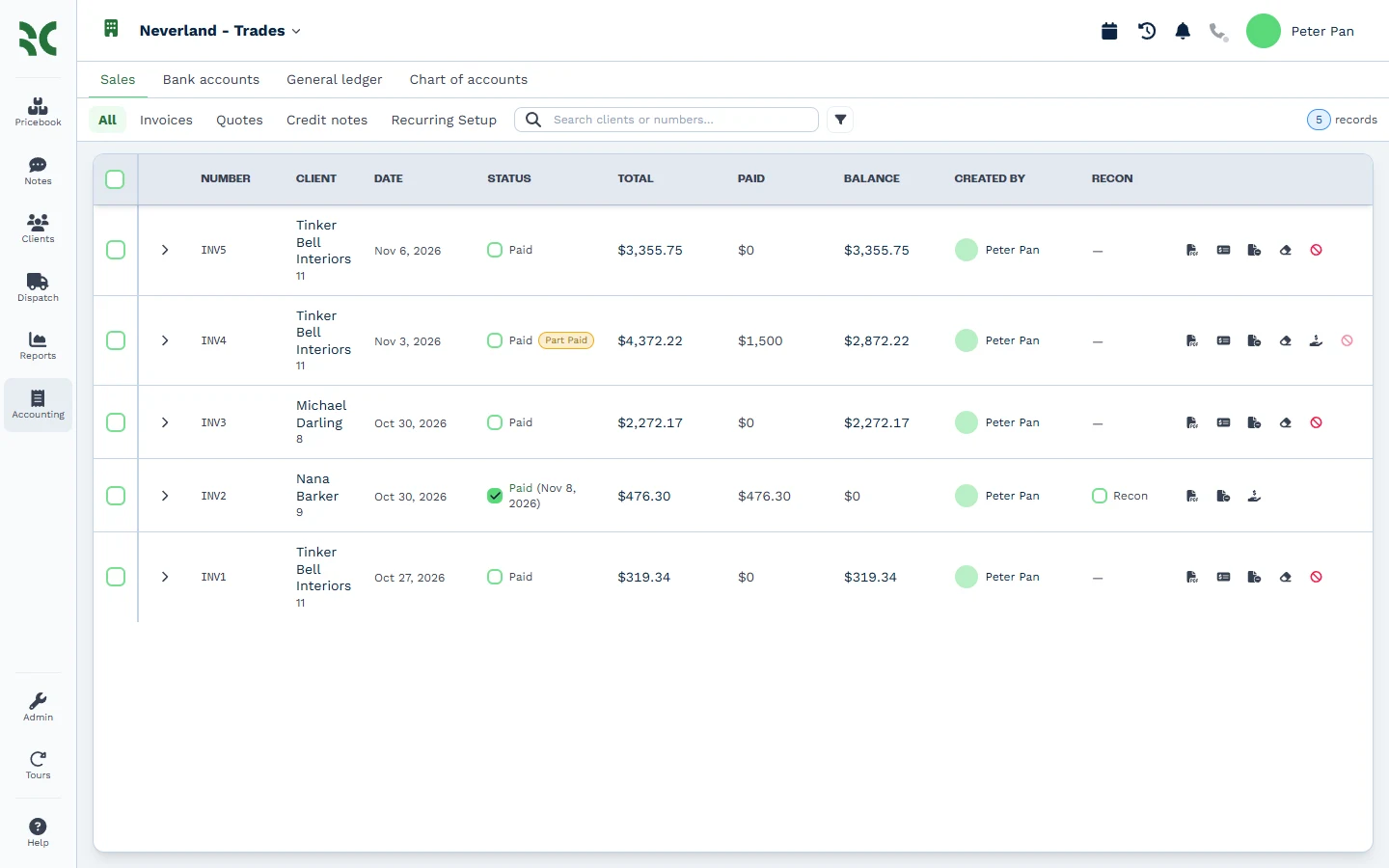
QuickBooks Online is the accounting system many US small businesses start with, and plenty of accountants know it well. Businesses start looking for a QuickBooks alternative when the books sit in one app and the work sits in another. The office manager raises an invoice in the CRM and types it again in QuickBooks. Then the payment gets matched twice.
This guide covers what to compare in an alternative, then how BaseCloud Books puts the accounting inside the system that already runs your quotes, invoices, jobs and clients.
Why businesses look for a QuickBooks alternative
The usual reason is double entry of the wrong kind. A plumbing company in Phoenix quotes a water heater install in its CRM, the customer accepts, and the invoice goes out from there. Then someone re-enters the same invoice in QuickBooks so the books are right.
Each copy is a chance for the two systems to disagree. A part payment recorded in one place and missed in the other leaves a customer chased for money they already paid. Month end turns into a hunt for the difference.
BaseCloud connects directly to QuickBooks Online for teams who keep it. Running the books in the same system removes the second copy altogether, which is why more service businesses now compare accounting that lives inside their CRM.
What to compare in a QuickBooks alternative
Look past the feature list and check the jobs your bookkeeper does every week:
- A ready-made chart of accounts for your country, with US sales tax or South African VAT
- Bank statements that arrive by themselves, and suggestions that match each bank line to the payment or invoice behind it
- Deposits, part payments, customer credit, credit notes and aged statements for slow payers
- Lock dates for filed periods, manual journals, a trial balance on any date and an audit trail your accountant trusts
- A clear route for your chart, tax rates and opening balances into the new system
- A role for your accountant or bookkeeper that fits how they already work
BaseCloud Books: accounting inside your CRM
BaseCloud includes full double-entry accounting: chart of accounts, bank feeds and reconciliation, journals, trial balance and lock dates, built from your invoices automatically. Every invoice, payment, credit note and refund writes itself into the general ledger the moment it is saved. Your quotes and invoices are entered once, and the books follow.
Bank feeds and reconciliation
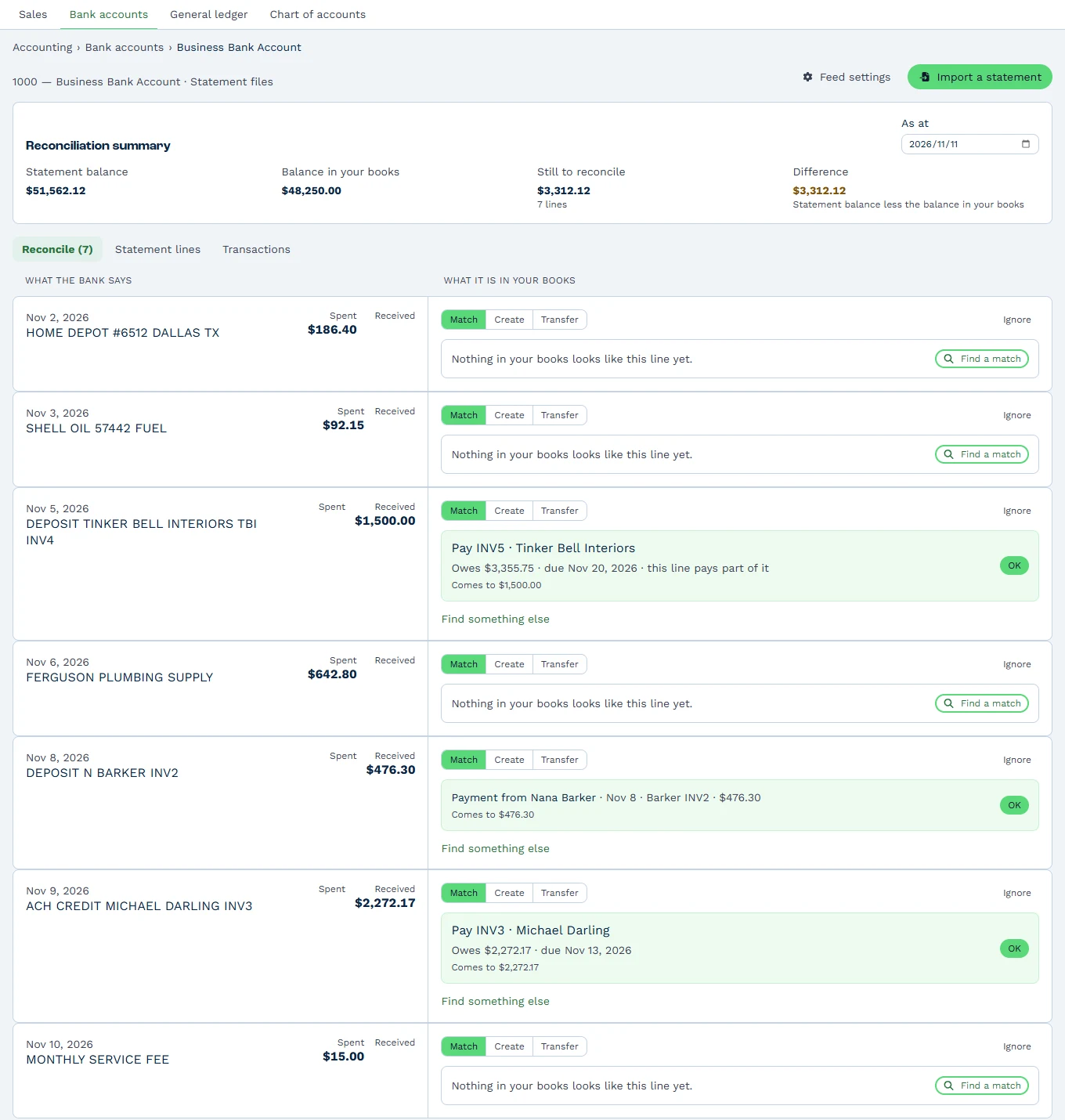
US banks connect through a live bank feed that brings in new transactions every hour. Any bank’s statement also imports as a CSV, OFX, QFX or QIF file. Reconciliation then suggests the match for every line.
A customer’s bank transfer matches straight to the invoice it pays, so the payment is recorded and reconciled in one click. A Stripe or Paystack payout matches to the batch of payments inside it, with the fees booked automatically. Bank rules fill in the everyday lines, such as the monthly bank fee or a software subscription.
Getting paid: part payments, credit and statements
Record deposits and part payments, each with its amount, date, method and reference. Spread one payment over several invoices with Fill oldest first, and any extra stays as the client’s credit for their next invoice.
Credit notes credit chosen lines or the whole invoice, and a discount agreed later goes on as an amount. A bad debt writes off to your Bad Debts account with the tax reversed. Customer statements go out as a PDF or by email in one click, aged into current, 1-30, 31-60, 61-90 and 90+ days.
Controls your accountant expects
Manual journals carry tax and reverse in one click. Two lock dates close a month for the team and a filed year for everyone, and your accountant keeps posting adjustments between them.
The trial balance shows any date, and retained earnings are worked out automatically at your financial year end. Every change posts a reversal and a new entry, so the books are their own audit trail.
Moving from QuickBooks to BaseCloud Books
Copy your chart of accounts and tax rates from Xero, QuickBooks or Sage in one step, enter your opening balances, and BaseCloud works out what every customer owes from your invoices. Setup runs in four steps: chart and start date, match your line codes to accounts, opening balances, then review.
Our team sets up your books with you and your bookkeeper. A clean start date is the first day after the last period you closed in QuickBooks, often January 1 for a US business. Your opening balances come from QuickBooks’ trial balance on the day before.
See the steps in how to set up BaseCloud Books.
BaseCloud also connects directly to QuickBooks Online
Some businesses keep QuickBooks because their accountant runs several clients in it. BaseCloud connects to QuickBooks Online with an Intuit sign-in, one connection per company.
The QuickBooks task in your automation workflows works with invoices, estimates, customers, payments and your chart of accounts in QuickBooks. The QuickBooks Trigger marks the BaseCloud invoice paid when a customer pays in QuickBooks, and catches up on anything it missed. Read the QuickBooks integration guide for the setup.
Which fits your business
QuickBooks suits a business whose accountant works in it every day across many clients, and BaseCloud connects to it for that team. BaseCloud Books suits a service business that already quotes and invoices in BaseCloud, takes payment there, and wants the books to build themselves from that work.
For an HVAC company in Dallas with four technicians, that means the invoice a technician raises on site is in the ledger before the van leaves the driveway. The office reconciles the Stripe payout on Friday, and the bookkeeper checks the trial balance at month end in the same system.
Book a demo and we will show you BaseCloud Books with your own chart of accounts.