









4.98 Google rating

For plumbing, drain and electrical contractors

CRM for Plumbers and Electricians

BaseCloud catches the burst-pipe call at 11 pm and the panel-upgrade quote you sent last week. Calls ring whoever is on call, quotes follow up on their own, and customers pay the invoice by card from a text.

Weighing us up against what you run now? Grab the CRM comparison sheet.

Clients who love our CRM system

Feel free to ask them about us.

  • Galetti
  • Quatro
  • Agriskills
  • Mastercare
  • Aluma
  • TutorsSA
  • Gawie le Roux Institute of Law
  • BNI
  • Vision Works
  • Intello Group

You can't answer the phone with your hands in a crawlspace. Your customer won't wait for you to try.

Most calls come in while you are on a job. Miss one and the homeowner calls the next plumber on the list. Quotes for water heaters, repipes and panel upgrades go out by text and are never chased, invoices wait until the weekend, and the reviews that would win the next job never get asked for.

What BaseCloud CRM solves

What a trade CRM should fix

  • Calls answered by the office, the on-call tech or a callback text
  • Quotes built from a price list and followed up for you
  • Invoices paid by card from a link, on the day of the job
  • Every call tied to the ad, truck or mailer that drove it
  • Water heaters, panels and fixtures logged per address
  • A review request after every completed job

How it works

From the call to the review

Four jobs that happen every day in a plumbing or electrical shop.

Emergency calls handled

A call menu puts emergencies straight through to the on-call tech's cellphone. Everything else goes to the office or a voicemail.

  • Missed calls get a text within seconds
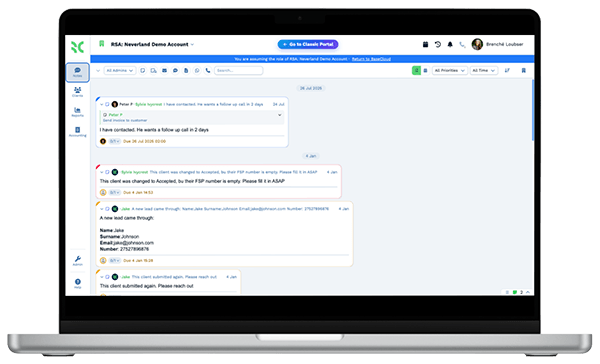
  • Calls recorded with a summary of the problem
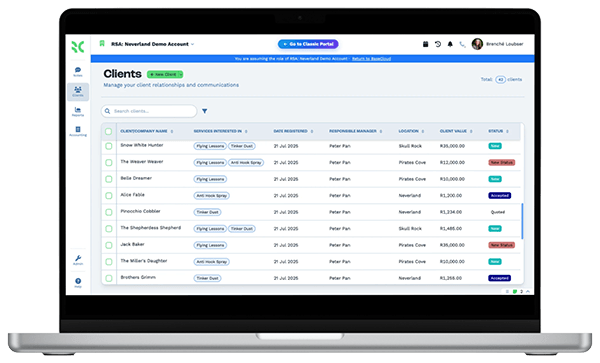
  • A new customer created on the first call

What you get

Built for the service van and the office

The parts of BaseCloud plumbers and electricians use most.

  • On-call routing to cellphones

    Emergencies ring the on-call tech's cellphone through follow-me. Office hours ring the office first.

  • Calls from the app or browser

    The BaseCloud Phone app shows your business number on outgoing calls, and every call lands on the customer.

  • Quotes, invoices and card payments

    Quote from a pricebook, convert to an invoice and send a Stripe payment link by text.

  • Tracking numbers for ads and trucks

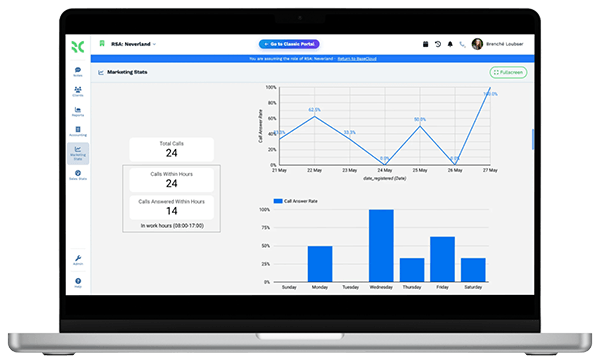
    A separate number on Google Ads, door hangers and van wraps shows which ones produce calls.

  • Google review requests and replies

    Ask for reviews after each job, reply to new ones and track your Google Maps rank.

  • Equipment per address

    Log water heaters, panels and fixtures with install dates, so the next visit starts with the facts.

The BaseCloud difference

Built in, not bolted on

Calling, texting, WhatsApp, email, quoting, e-signature and automation are part of BaseCloud, not add-ons from other vendors. One login, one client record, and no connectors to keep alive between separate subscriptions.

  • Phone system
  • SMS
  • WhatsApp
  • Gmail / Microsoft 365
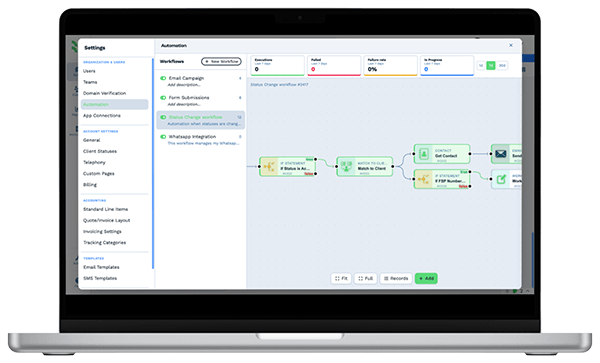
  • Workflow automation
  • Quotes & invoices
  • E-signature

Plumbers & Electricians on BaseCloud

One burst pipe, from midnight call to five-star review

This is an example of how a small shop can set up BaseCloud. Every step is a standard workflow you can change.

Example workflow

A homeowner with water coming through the ceiling

The homeowner found you through a Google ad and calls at 11:40 pm. Here is what happens next.

  1. 1. Call routed

    The menu sends the emergency to the on-call plumber's cellphone. The tracking number logs the Google ad.

  2. 2. Customer created

    The call creates the customer with the address. The recording and summary are saved.

  3. 3. Job done

    The plumber fixes the leak and quotes a repipe for the damaged section from the pricebook.

  4. 4. Paid on site

    The invoice goes out by text with a payment link. The card payment is recorded.

  5. 5. Quote chased

    The repipe quote gets follow-up texts. The homeowner accepts on day four.

  6. 6. Review asked

    After the repipe, a review request goes out. The new review gets a reply the same day.

The tech stays on the tools. Calls, quotes, payments and reviews are handled around them.

We pride ourselves on 5-Star Service

4.98 Google rating

Read our reviews on Google

FAQ

Plumbing and electrical CRM questions

Does BaseCloud work with ServiceTitan or Jobber?
There is no built-in integration. Customers and jobs can be imported from CSV or sent in by webhook if your current software supports it. BaseCloud covers calls, texting, quotes, invoices, payments and reviews in one place.
Can calls ring my cellphone when I'm on a job?
Yes. Call flows can ring a team member's cellphone, try the next person if nobody answers, and send the caller a text if the call is missed.
Can customers pay by card?
Yes. Invoices include a Stripe payment link, so customers can pay from their phone and the payment is recorded on the invoice.
Can I see which ads bring in calls?
Yes. Each ad, mailer or vehicle can have its own tracking number, and reports show calls and jobs by source.
Is there a mobile app?
Yes. The BaseCloud Phone app for iOS and Android makes and takes calls on your business number, and the CRM itself can be installed on your phone as a web app.

Fewer missed calls. More booked jobs.

Tell us how your shop runs calls, quotes and invoices, and we'll show you the same day in BaseCloud.

See it for yourself

Watch the system in action