










4.98 Google rating

For inbound, outbound and outsourced call teams

Call Center CRM with the Phone System Built In

BaseCloud is a call center CRM where the phone system is part of the product, not a connector to another vendor. Agents take and make calls in the browser, every call is recorded and summarized on the customer record, and supervisors see calls by agent without exporting anything.

Weighing us up against what you run now? Grab the CRM comparison sheet.

Every call recorded and summarized

Example workflowFrom incoming call to wrap-up

Clients who love our CRM system

Feel free to ask them about us.

  • Galetti
  • Quatro
  • Agriskills
  • Mastercare
  • Aluma
  • TutorsSA
  • Gawie le Roux Institute of Law
  • BNI
  • Vision Works
  • Intello Group

Agents lose time switching between screens. Customers lose patience repeating themselves.

A typical floor runs a phone system from one vendor, a CRM from another and a texting tool from a third. The agent answers, hunts for the customer, types notes while talking and forgets half of what was agreed. The next agent who takes that customer's call starts from zero. Supervisors pull call logs from one system and outcomes from another to see who is actually productive.

What BaseCloud CRM solves

What a call center CRM should fix

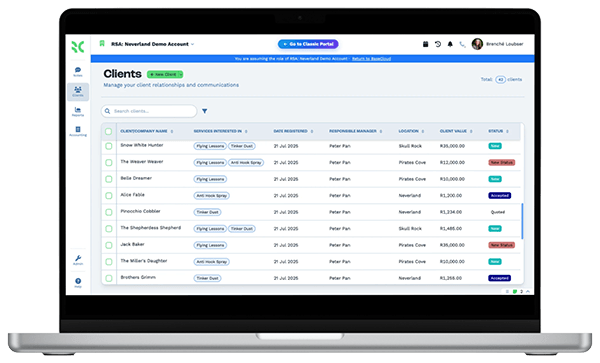
  • The caller's record on screen when the call comes in, not after a search
  • Callers routed by a menu to the right team, then to whoever is free
  • Notes written by AI from the recording, so agents can take the next call
  • Warm transfers to a supervisor or specialist without losing the caller
  • Texts and WhatsApp messages in the same queue as the calls
  • Calls, talk time and outcomes per agent without a spreadsheet

How it works

From the first ring to the follow-up

Four things every call floor does all day, and how BaseCloud handles each one.

Callers reach the right team first time

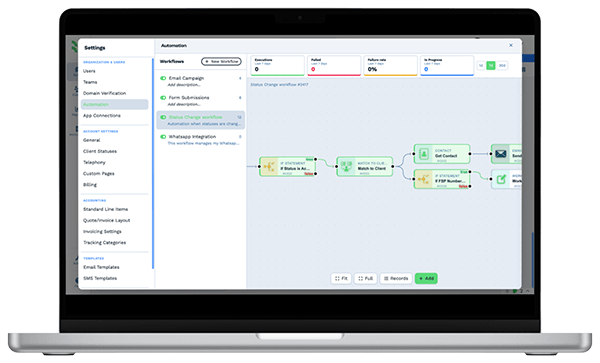
Build call flows on a visual canvas. A menu sends callers to sales, support or billing, and each ring group tries its members in the order you set.

  • Press-1 menus with your own recorded greetings and audio clips
  • Ring steps that move to the next group or a manager's cellphone when nobody answers
  • Voicemail saved against the customer when the call isn't picked up

What you get

The tools an agent and a supervisor live in

The parts of BaseCloud a call team uses every shift, described the way a call floor talks.

  • A softphone in every agent's browser

    Agents call from the CRM with noise cancellation, or from the BaseCloud Phone app or a SIP desk phone. Numbers can be ported in or bought locally.

  • IVR menus and ring groups

    Design call flows visually with menus, greetings, ring steps and fallbacks to cellphones, so every caller has a path to a person.

  • Recording, transcripts and AI summaries

    Every call recorded and transcribed, with a summary and action points on the customer. Useful for quality reviews, coaching and disputes.

  • One inbox for SMS and WhatsApp

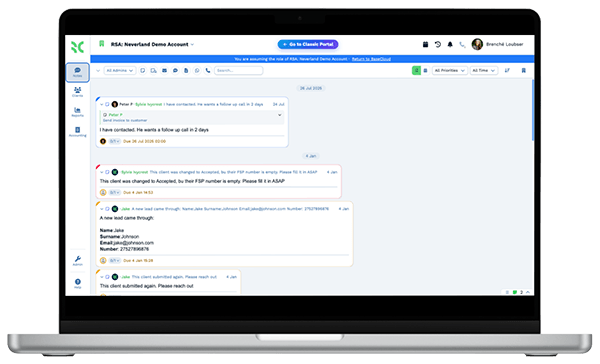
    Text and WhatsApp threads assigned to agents or teams, with an unclaimed queue and the full customer history beside each message.

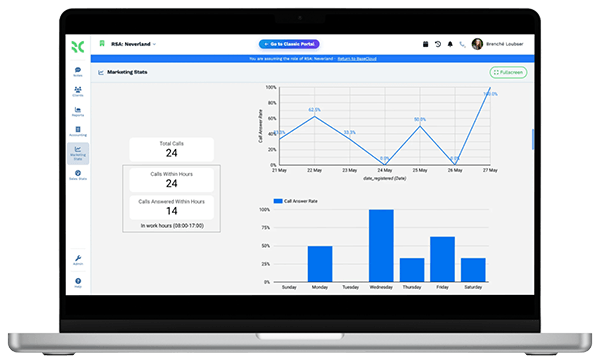
  • Calls by agent, live on a dashboard

    Report on calls by user, call outcomes and follow-ups completed. Build dashboards per team and export any report to CSV.

  • Call outcomes that trigger the next step

    Set an outcome and a workflow sends the follow-up text, books the callback, updates the record or posts the result to your client's system by webhook.

The BaseCloud difference

Built in, not bolted on

Calling, texting, WhatsApp, email, quoting, e-signature and automation are part of BaseCloud, not add-ons from other vendors. One login, one client record, and no connectors to keep alive between separate subscriptions.

  • Phone system
  • SMS
  • WhatsApp
  • Gmail / Microsoft 365
  • Workflow automation
  • Quotes & invoices
  • E-signature

Call Centers on BaseCloud

One inbound call, start to finish

This is an example of how a support team can set up BaseCloud for inbound calls. Every step is a standard call flow or workflow you can change.

Example workflow

A billing question on a busy Monday morning

A customer calls the main number about a charge on their account while most of the team is already on calls.

  1. 1. Menu answers

    The caller hears your greeting and presses 2 for billing. The call goes to the billing ring group.

  2. 2. Agent picks up

    The first free agent answers in the browser with the customer's record, past calls and open notes already showing.

  3. 3. Specialist joins

    The agent needs a supervisor's approval and adds them to the call as a conference, then drops off.

  4. 4. Summary written

    The call is recorded and transcribed. An AI summary with the agreed action points lands on the customer record.

  5. 5. Follow-up set

    The outcome is set to Credit approved. A workflow sends a confirmation text and creates a Workflow Note for the finance team.

  6. 6. Reported

    The call counts toward the agent's daily total on the team dashboard, alongside talk time and outcomes.

Agents stay on the phone with customers. Routing, notes and follow-up happen around them.

We pride ourselves on 5-Star Service

4.98 Google rating

Read our reviews on Google

FAQ

Call center CRM questions

Do we need a separate phone system or dialer?
No separate phone system is needed. BaseCloud includes the softphone, numbers, IVR menus, ring groups, transfers, conference calls, voicemail and recording. It does not include a predictive or power dialer, so outbound calls are placed by agents one at a time from the record or a call list.
Can agents work from home?
Yes. Agents call from any browser with a headset, or from the BaseCloud Phone app on iOS and Android. SIP desk phones can also be registered, though they are set up manually.
Are calls recorded, and who can listen to them?
Every call is recorded and attached to the customer record with a transcript and an AI summary. Roles and permissions control who can see records and recordings. You remain responsible for telling callers they are being recorded where the law requires it.
Can we keep our existing numbers?
Yes. US and South African numbers can be ported into BaseCloud, and new local numbers can be bought. Call tracking numbers are also available in 15 countries.
Does it connect to our clients' own CRMs or support software?
There is no built-in connection to other CRMs or support software. A workflow can send call outcomes and summaries out by webhook, and data can come in by webhook, the public API or CSV import.
How do supervisors see agent performance?
Report dashboards show calls by user, call outcomes, follow-ups completed and lead sources. Supervisors can open any recording and summary from the customer record, and the activity log shows who changed what.

Less screen switching. More calls handled well.

Tell us how your floor routes and wraps up calls today, and we'll show you the same setup running inside BaseCloud.

See it for yourself

Watch the system in action