
CRM calendar and scheduling
A CRM calendar that syncs with Google and Outlook, and books meetings for you
Your Google or Outlook calendar, inside your CRM. See your team's week in one view, book meetings with clients from their record, and let workflows and AI agents send the reminders, find open times and make the booking.
See pricing · Every feature is on every plan.
At a glance
- Two-way Google Calendar and Outlook sync
- Team calendars side by side, in color
- Microsoft Teams and Google Meet links
- Automated reminders and follow-ups
- AI agents that find a time and book it
See it in action
Watch the CRM calendar at work
A short tour of the calendar inside BaseCloud CRM, recorded on a live account.
The problem
Your calendar and your CRM shouldn't be strangers
When meetings live in one tool and clients in another, someone has to copy details across, chase confirmations and remember to follow up. That is where appointments get missed.
Back-and-forth to find a time
Finding a slot that suits a customer and your team takes a chain of messages.
No-shows nobody reminded
Reminders depend on someone remembering to send them the day before.
Meetings missing from the client record
The appointment is on a calendar, but the client's history doesn't show it.
Double bookings
Without everyone's availability in one place, two people get booked for the same hour.
How it works
From connected calendar to booked meeting
Connect Google or Microsoft 365
Link your mailbox and your calendar comes with it. Your existing meetings come in, and changes sync both ways from then on.
Book with everyone's availability in view
Invite colleagues and clients, check who is busy in the Scheduling view, and add a Teams or Google Meet link.
Let workflows do the reminders
A Calendar Trigger starts a workflow before or after a meeting, or when one is booked, moved or canceled.
Let workflows and AI do the booking
The Calendar action finds open times across your team and books the meeting. An AI agent can do it mid-conversation.
What it does
Everything a CRM calendar should do
A full calendar on every plan, tied to your clients and to the workflow builder. It also works on its own if you don't connect Google or Outlook.
Two-way Google Calendar and Outlook sync
Meetings made in BaseCloud go straight to Google or Outlook, and changes there appear in BaseCloud within about a minute, including guests' replies.
Team calendars in one view
Tick the colleagues you want to see and each calendar gets its own color. Book straight onto a colleague's calendar if you have access.
Scheduling assistant
See when each guest is busy before you send the invitation, with a conflict warning if the time clashes.
Teams and Google Meet links
Add an online meeting link with one tick. Outlook-connected calendars get Microsoft Teams, and Google ones get Google Meet.
Recurring meetings
Repeat daily, weekly, monthly or yearly, on a date or the second Tuesday. Change one occurrence or the whole series.
Invitations and RSVPs
Guests get a normal calendar invitation. Accept, decline or say maybe from the calendar or your CRM inbox, and handle a new time a guest proposes.
Meetings on the client record
Start a meeting from a client and their contacts are ready to invite. Meetings linked to a client show on that client's record.
Automated reminders and follow-ups
Text a reminder the day before, send the new time when a meeting moves, or ask for a review an hour after it ends, by SMS, WhatsApp or email.
Booking from a workflow
Book, move or cancel meetings as a workflow step, and find open times within your working hours, spread evenly across your team.
AI appointment scheduling
An AI agent on WhatsApp or SMS checks your team's free time while it talks to a customer, and books the meeting they choose.
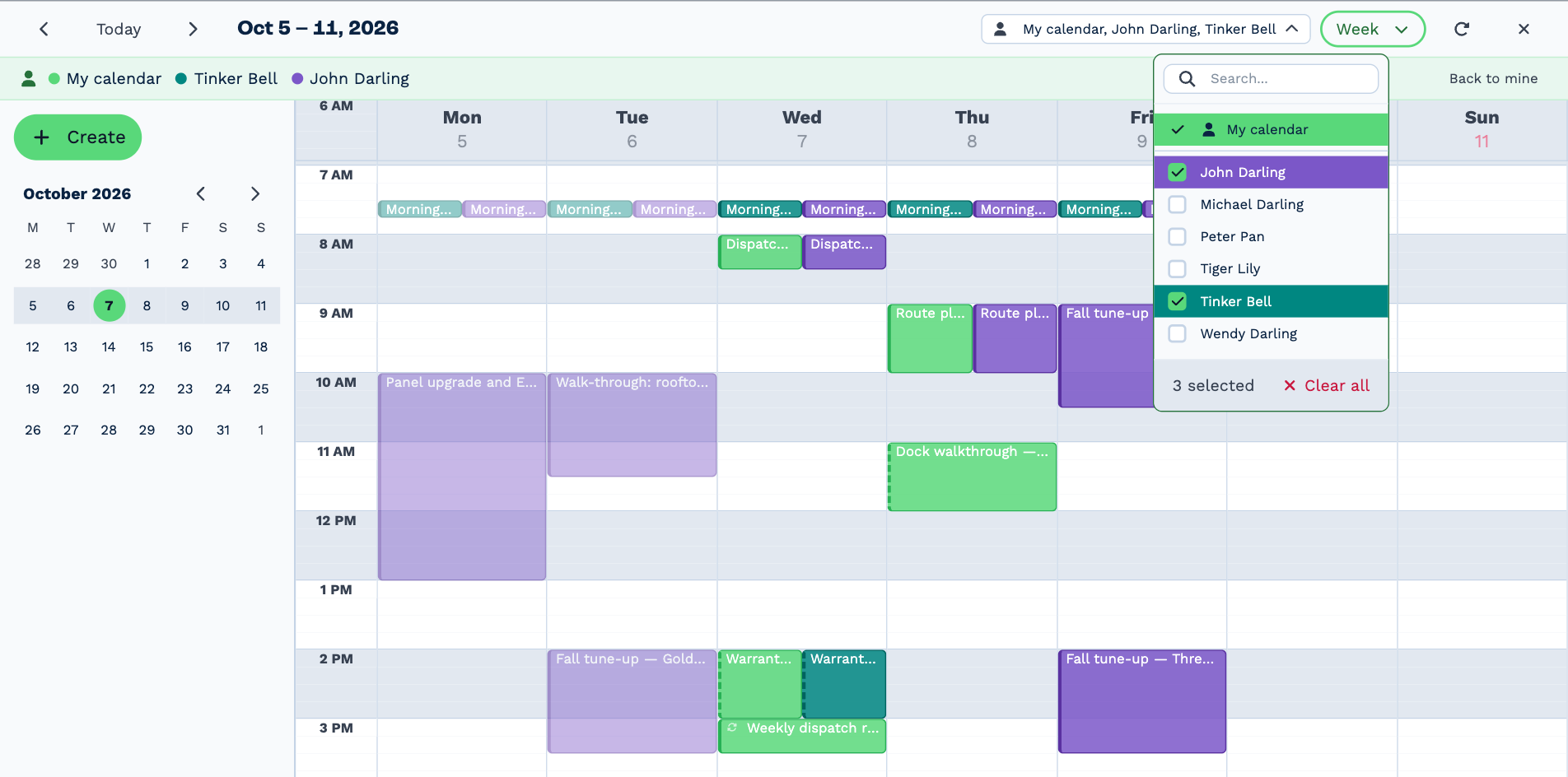
Your whole team's week on one screen
Pick the people you want to see and their calendars sit side by side, each in its own color. You can see who is free before you promise a customer a time.
Switch between day, week and month, hide weekends, and show the Workflow Notes due each day next to your meetings.
- Day, week and month views, on desktop and mobile
- Drag a meeting to move it or change its length
- Private calendars still show as busy, without the details
- A permission controls who can see and edit other people's calendars
Reference
Calendar automation, trigger by trigger
Calendar automation works the same whether a meeting was made in BaseCloud, by a workflow, or directly in Google Calendar or Outlook.
Start a workflow when
- A meeting is coming up (minutes, hours or days before)
- A meeting has ended, or a set time after
- A meeting is booked
- A meeting is moved
- A meeting is canceled
Do this in a workflow
- Book a meeting and invite the guests
- Change or move a meeting
- Cancel a meeting and tell the guests
- Find meetings by person, client, date or title
- Find open times to offer a customer
Popular calendar workflows
- Text an appointment reminder the day before
- Book a consultation when a website form arrives
- Offer three open times by SMS or WhatsApp, then book one
- Send a thank-you or review request after the meeting
- Tell the rep when a customer cancels
One platform
Scheduling that runs through the whole CRM
The calendar shares the client record with your calls, messages and workflows, so a booked meeting can set everything else in motion.
Automation workflows
A visual workflow builder with 15 triggers and 49 actions.AI CRM
AI agents with tools, call summaries and AI search, on the model you choose.Email tracking and shared inboxes
Gmail and Microsoft 365 sync, open tracking, team inboxes and email rules.Business texting (SMS)
Two-way and bulk texting, with US 10DLC registration handled for you.WhatsApp CRM
WhatsApp Business in a shared inbox, with an AI agent that can reply.Google reviews and local rank
Act on every new Google review and track your Google Maps ranking.
Popular with
Learn more
- The calendar scheduling assistantHow to check everyone's availability before you book.
- Calendar integration setupA video walkthrough of connecting your calendar.
Step-by-step docs
FAQ
Questions buyers ask
Does BaseCloud CRM integrate with Google Calendar?
Does it work with Outlook and Microsoft 365?
Can the CRM send appointment reminders automatically?
Can AI book appointments for us?
Can I see my whole team's calendars?
Do I need Google or Outlook to use the calendar?
Put your calendar to work
Connect Google or Outlook, see your team's week in one place and let BaseCloud CRM handle the reminders and the booking.