
Call tracking
Call tracking software that lives in your CRM
Give each ad, campaign or listing its own phone number. When someone calls it, BaseCloud forwards the call, records it, matches the caller to a client and shows you which source made the phone ring.
See pricing · Every feature is on every plan.
At a glance
- Tracking numbers in 15 countries
- Every call credited to its source
- Calls recorded and matched to the client
- Missed calls reach your workflows too
- Sales reported back to Google Ads
The problem
Your ads make the phone ring. Which ones?
Form leads are easy to trace back to an ad. Phone calls aren't, and for many service businesses the phone is where the best leads come from.
Calls look like they came from nowhere
Without a tracking number, a call from a Google ad looks exactly like a call from a yard sign or a referral.
Budget follows the wrong channel
You cut the campaign that was producing calls and keep the one that wasn't.
Missed calls vanish
A missed call from an unknown number is easy to ignore, and that caller may have been ready to buy.
Call data sits in another tool
Standalone call tracking keeps calls in its own dashboard, away from the client record and the follow-up.
How it works
How call tracking works in BaseCloud
Tracking numbers are a trigger in the workflow builder, so a call doesn't just get counted. It starts the next step.
Create a tracking number
Add the Call Tracking Number trigger to a workflow, pick the country and area code, and enter the number calls should forward to.
Put it where the lead sees it
Use a different number for each ad, campaign, landing page, directory listing or billboard.
Calls forward and are logged
The call goes through to your destination number. The workflow receives the caller's number, the tracking number, the call status, the duration and the recording link.
Your workflow takes over
Match the caller to a client or create one, share new callers out with round robin, send a Workflow Note with the recording, and start a follow-up if the call was missed.
What it does
Call attribution with the follow-up built in
BaseCloud combines what a call tracking tool records with what a CRM does next. Every call is credited to a source and lands on a client record your team works from.
Numbers in 15 countries
Local tracking numbers in the US, Canada, the UK, Ireland, Australia, New Zealand, South Africa and eight more European countries.
Source attribution
Each number belongs to one source, so every call is credited to the ad, campaign or listing that produced it.
The whole life of the call
The trigger covers ringing, answered, missed and completed calls, so missed calls reach the workflow as well as answered ones.
Recorded calls
Tracked calls are recorded, and the recording link is passed to the workflow and kept with the client.
Client matching
Match to Client checks whether the caller already exists. New callers become new clients, with the source filled in.
Fair lead distribution
Round Robin Select shares new callers evenly across your team.
Report sales back to Google Ads
When a tracked call becomes a customer, upload an offline conversion so Google Ads learns from real outcomes, not just calls.
Calls in your reports
Report dashboards can show calls by user and leads by origin, next to the rest of your pipeline.
Set up a tracking number from the workflow builder
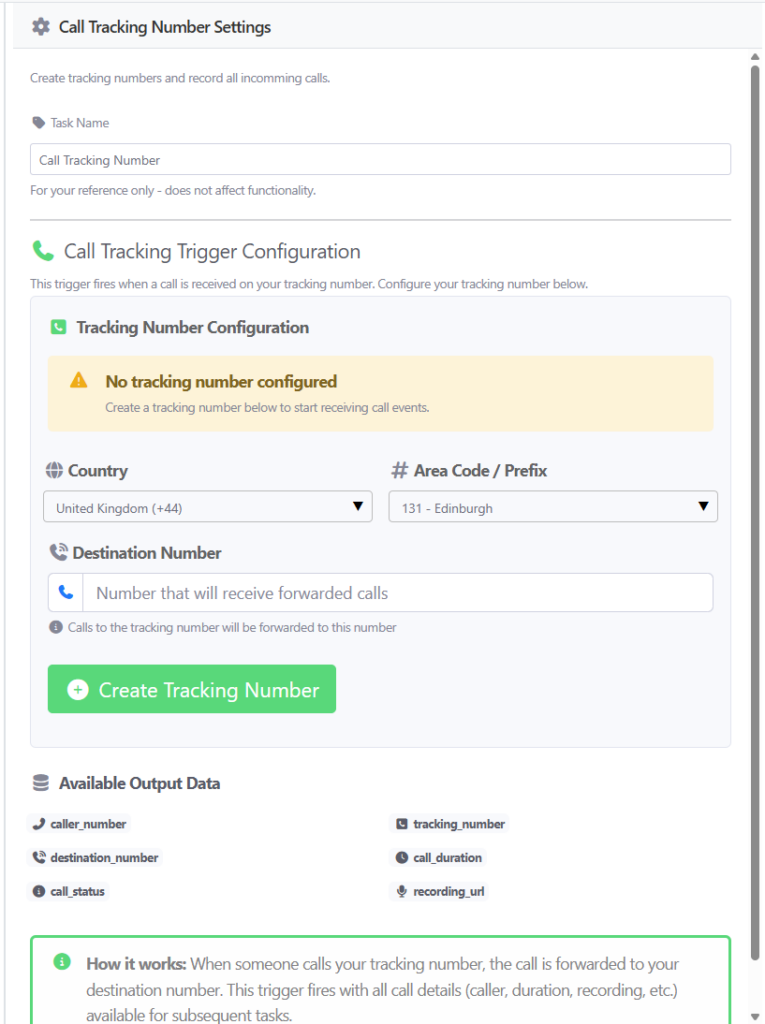
Choose a country and area code, enter the destination number, and create the tracking number. Calls to it are forwarded to your destination number.
The settings list the data every call passes to the next steps in your workflow.
- Caller number and tracking number
- Destination number
- Call duration and call status
- The recording URL
Reference
Countries with tracking numbers
Local tracking numbers are available in these 15 countries, so a campaign in each market can show a number people there recognize.
North America
- United States
- Canada
UK, Ireland and Oceania
- United Kingdom
- Ireland
- Australia
- New Zealand
Europe
- Germany
- France
- Netherlands
- Belgium
- Spain
- Italy
- Sweden
- Poland
Africa
- South Africa
One platform
Call tracking is one part of lead attribution
Tracking numbers cover phone leads. These features cover the rest of the journey, from the ad click to the follow-up call.
Lead tracking and attribution
UTM capture, forms, Facebook Lead Ads and conversions sent back to your ads.Phone system
Browser and mobile calling, numbers, IVR, ring groups and transfers.Call recording and AI summaries
Every call recorded, transcribed and summarized on the client record.Call Connect
Rings your rep the moment a web form arrives and connects them to the lead.Automation workflows
A visual workflow builder with 15 triggers and 49 actions.
Popular with
Learn more
- Global call tracking numbersA feature focus on tracking numbers outside the US.
- Phone call tracking workflowA worked example, step by step.
Step-by-step docs
FAQ
Questions buyers ask
What is a call tracking number?
Which countries can I get tracking numbers in?
Do I need a separate call tracking tool?
Can I see which Google Ads campaign a call came from?
What happens when a tracked call is missed?
Are tracked calls recorded?
Find out which ads make your phone ring
Book a demo and we'll walk you through a tracking number workflow, from the first ring to the client record.