









4.98 Google rating

For home service companies, contractors and field service teams

Field Service CRM for Home Service Businesses

BaseCloud is a home service CRM for the office side of the job. It answers and records the call, sends the quote from your pricebook, texts the customer before the visit, takes payment on the invoice and asks for the review. Each job moves across a board you set up for your own trade.

Weighing us up against what you run now? Grab the CRM comparison sheet.

Clients who love our CRM system

Feel free to ask them about us.

  • Galetti
  • Quatro
  • Agriskills
  • Mastercare
  • Aluma
  • TutorsSA
  • Gawie le Roux Institute of Law
  • BNI
  • Vision Works
  • Intello Group

The work happens in the customer's driveway. The job is won or lost on the phone.

Calls come in while every tech is on a job and the office is on another line. The caller who gets voicemail tries the next company on Google. Quotes go out and are never followed up, the customer isn't told when someone is coming, invoices wait until the weekend, and the reviews that would win the next job never get asked for.

What BaseCloud CRM solves

What a field service CRM should fix

  • Every call answered, or returned with a text within seconds
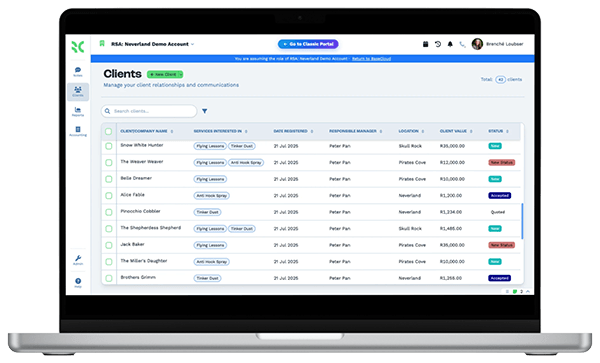
  • Each job in one place, from the first call to the paid invoice
  • Quotes built from a pricebook and followed up until there is an answer
  • Customers reminded before the visit and told when the tech is on the way
  • Invoices paid by card from a link, on the day of the job
  • A review request after every completed job

How it works

From the first call to the paid invoice

Four jobs every home service office handles each day, set up once in BaseCloud.

Every call answered or returned

A call menu separates emergencies, new work and existing customers. Ring groups cover the office, and after hours a call can follow the on-call tech to their cellphone.

  • Missed calls get an instant text and a callback task
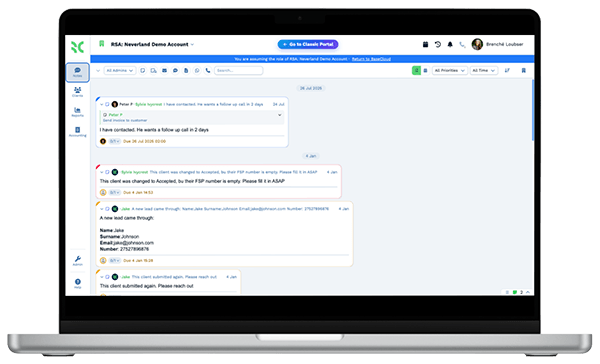
  • Every call recorded, transcribed and summarized on the customer
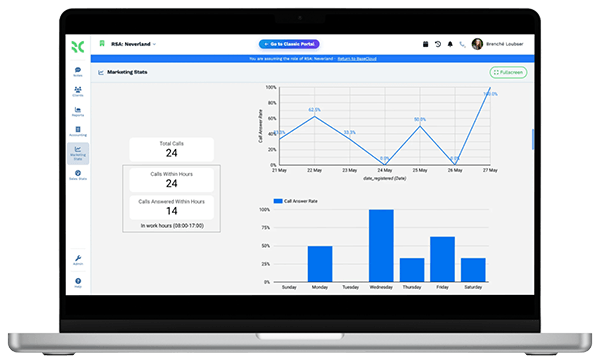
  • Tracking numbers show which ad, mailer or truck wrap made the phone ring

What you get

Built for the office behind the trucks

The BaseCloud features a home service company uses every day, in shop terms.

  • Call menus and on-call routing

    An IVR menu, ring groups and follow-me to a tech's cellphone, so emergency calls reach a person day or night.

  • Calls recorded and summarized

    Every call is recorded and transcribed with an AI summary, so the tech knows what the customer said before knocking on the door.

  • A jobs board for your trade

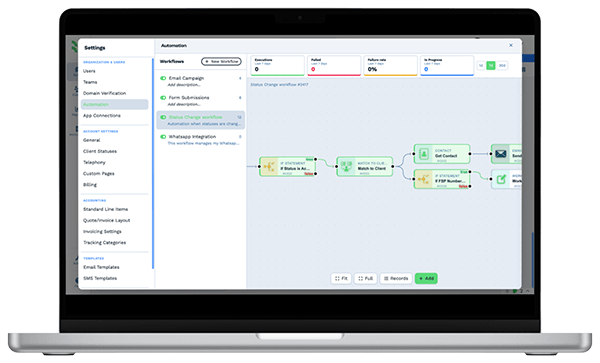
    A custom table of jobs shown as a Kanban board, with your own stages, an owner per job, files on the card and workflows that run when a card moves.

  • Visits, reminders and team calendar

    Two-way Google and Outlook calendar sync, a team view in color, and reminder texts sent before each visit.

  • Pricebook quotes and online payment

    Quote from a pricebook with bundles, convert to an invoice, and take card payment from a link sent by text or email.

  • Google reviews and rank grid

    Ask for a review after each job, reply to new ones, and see your Google Maps ranking across your service area.

The BaseCloud difference

Built in, not bolted on

Calling, texting, WhatsApp, email, quoting, e-signature and automation are part of BaseCloud, not add-ons from other vendors. One login, one client record, and no connectors to keep alive between separate subscriptions.

  • Phone system
  • SMS
  • WhatsApp
  • Gmail / Microsoft 365
  • Workflow automation
  • Quotes & invoices
  • E-signature

Home & Field Services on BaseCloud

One service call, from ad click to five-star review

This is an example of how a home service company can set up BaseCloud. It is a sample setup, not a customer story, and every step is a standard workflow you can change.

Example workflow

A homeowner whose garage door won't open on a Monday morning

The homeowner finds you through a Google ad and calls while your techs are already on jobs. Here is what happens next.

  1. 1. Call answered

    The call comes in on a tracking number, so the Google ad is logged. The office answers, and the recording and summary are saved on a new customer.

  2. 2. Job booked

    The office adds a job card to the board and books the visit in the tech's calendar for that afternoon.

  3. 3. Customer updated

    A text confirms the time. When the tech clicks the Notify Client button on the card, the customer is told they are on the way.

  4. 4. Quote approved

    The tech quotes a spring replacement and a new opener from the pricebook. The customer accepts the repair and asks to think about the opener.

  5. 5. Paid on site

    The quote becomes an invoice sent by text with a payment link. The card payment is recorded and the card moves to Complete.

  6. 6. Review asked

    Moving the card sends a review request. A week later, a follow-up text asks about the opener quote.

The techs stay on the tools. Calls, reminders, quotes, payments and reviews are handled around them.

We pride ourselves on 5-Star Service

4.98 Google rating

Read our reviews on Google

FAQ

Field service CRM questions

Is BaseCloud field service management software like ServiceTitan, Jobber or Housecall Pro?
No, and it is better to know that up front. BaseCloud has no dispatch board, route optimization, GPS or fleet tracking, offline technician app with job checklists, inventory or parts management, or flat-rate pricebook imports from distributors. It is a CRM that covers the customer side. Calls are recorded and summarized, and you get texting, WhatsApp, a calendar with reminders, quotes from your own pricebook, invoices with online payment, e-signature, a Kanban board for jobs, automation workflows, Google review requests and call tracking. If you need dispatch and routing, keep your field service software for that.
How do we schedule and assign jobs without a dispatch board?
Visits are booked into each tech's Google or Outlook calendar, and a team calendar shows everyone's day side by side in color. Each job is also a card on a board built from a custom table, with a stage, an owner and a due date. BaseCloud does not plan routes or pick the nearest tech, so the office decides who goes where.
Can technicians use BaseCloud in the field?
Yes, with a connection. The BaseCloud Phone app for iOS and Android makes and takes calls on your business number, and the CRM opens in a phone or tablet browser and can be installed as a web app. Techs can see the customer, update the job card, upload photos and send a quote or invoice. There is no offline mode.
Can we quote from a pricebook and get paid online?
Yes. You build your own pricebook with cost and price per item and group items into bundles, and you can import items from a CSV file. Accepted quotes convert to invoices with a Stripe card payment link. Invoices sync to Xero or Sage, and QuickBooks is connected through automation workflows.
Which trades is this page for?
Any business that sends people to a customer's property, such as garage door, appliance repair, pest control, landscaping, roofing, pool service and handyman companies. Some trades have their own page with setups specific to them. See HVAC, plumbing and electrical, cleaning and solar.
Can we keep our phone numbers and text customers from them?
Yes. Existing US numbers can be ported into BaseCloud, and you can add tracking numbers for ads, mailers and vehicles. Two-way texts go out from your business numbers, and BaseCloud registers your 10DLC brand and campaign for you.

Every call answered. Every job followed through.

Tell us how your office handles calls, scheduling, quotes and invoices, and we'll show you that setup in BaseCloud.

See it for yourself

Watch the system in action