










4.98 Google rating

For franchisors, multi-unit owners and franchisees

Franchise CRM for Brands and Every Location

BaseCloud is a franchise CRM that gives the brand one playbook and each location its own leads. Inquiries go to the right franchisee automatically, every location follows up the same way, and head office can see which territories are working.

Weighing us up against what you run now? Grab the CRM comparison sheet.

Franchise head office and location managers sharing leads and follow-up in BaseCloud CRM

Leads routed to the right location

Example workflowFrom brand ad to local booking

Clients who love our CRM system

Feel free to ask them about us.

  • Galetti
  • Quatro
  • Agriskills
  • Mastercare
  • Aluma
  • TutorsSA
  • Gawie le Roux Institute of Law
  • BNI
  • Vision Works
  • Intello Group

The brand pays for the leads. The locations decide whether they get worked.

National ads and the brand website produce inquiries every day. Someone at head office forwards them to a franchisee by email, and nobody knows if the call was ever made. One location uses a spreadsheet, another uses its own app, a third uses a notebook. When the brand asks which markets are converting, the answer takes a week of chasing owners for numbers.

What BaseCloud CRM solves

What a franchise CRM should fix

  • Brand-generated leads sent to the right location by ZIP code or territory
  • The same follow-up steps run at every location, not just the strongest ones
  • Franchisees seeing their own customers, and only their own
  • Approved email, text and document templates the whole network uses
  • Head office able to step into any location to help or check
  • Leads, calls and results compared by location on one dashboard

How it works

From the brand's ad to the local customer

Four jobs that span head office and the locations, and how BaseCloud runs each one.

Every lead to the right territory

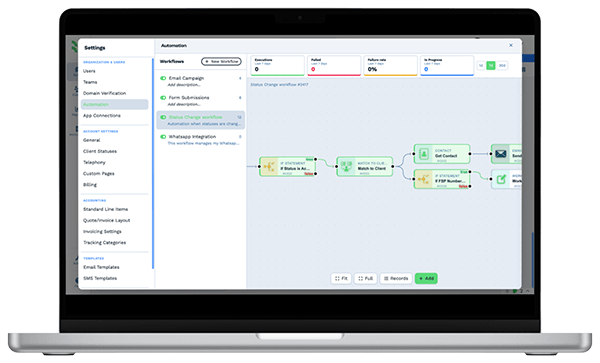
Website forms and Facebook lead ads arrive centrally. A workflow reads the ZIP code or chosen location and assigns the lead to that franchisee's team.

  • If steps match ZIP codes or a location dropdown to the right team
  • Round Robin Select spreads leads across staff inside a location
  • Call Connect rings the location the moment a web lead arrives

What you get

One brand, many locations, one system

The parts of BaseCloud a franchise network uses, put the way franchisors and franchisees describe them.

  • Brand leads captured centrally

    Brand website forms, Facebook lead ads and webhooks from your locator page all land in BaseCloud with the source recorded.

  • Territory routing without manual forwarding

    Workflows assign each lead to a location by ZIP code, territory or chosen store, then start that location's follow-up.

  • A Location field on every customer

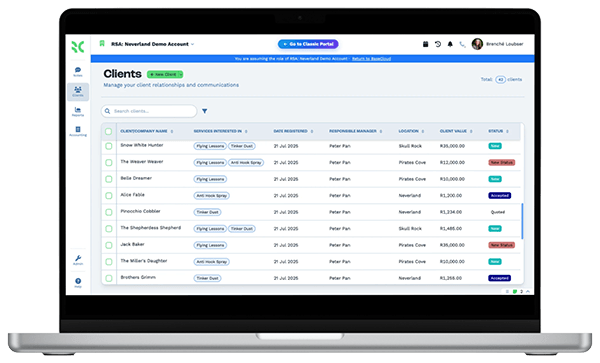
    A colored location dropdown, plus franchise-specific fields and tables, so any record shows which store owns it and what was sold.

  • Local numbers for every location

    Each location has its own numbers, ring groups and menus, and calls are recorded and summarized on the customer record.

  • Reviews and map rankings per location

    Request and reply to Google reviews for each location and track each store's Google Maps ranking on a local grid.

  • Location league tables

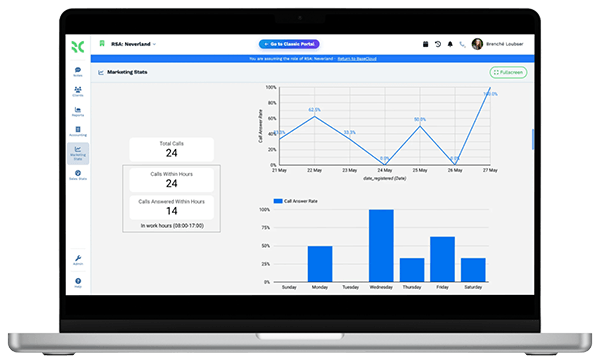
    Dashboards that compare leads, calls and conversions across locations, with CSV export for franchise reviews.

The BaseCloud difference

Built in, not bolted on

Calling, texting, WhatsApp, email, quoting, e-signature and automation are part of BaseCloud, not add-ons from other vendors. One login, one client record, and no connectors to keep alive between separate subscriptions.

  • Phone system
  • SMS
  • WhatsApp
  • Gmail / Microsoft 365
  • Workflow automation
  • Quotes & invoices
  • E-signature

Franchises on BaseCloud

One brand lead, delivered to one location

This is an example of how a franchise brand can set up BaseCloud for lead routing. Every step is a standard workflow you can change.

Example workflow

A home-services franchise with locations in several states

A homeowner fills in the brand's Facebook lead form on a Tuesday night. The brand has a location covering their ZIP code.

  1. 1. Lead captured

    The lead ad creates the customer with the campaign recorded and the ZIP code in a field.

  2. 2. Location matched

    An If step matches the ZIP code to a territory and assigns the customer to that location's team.

  3. 3. Location calls

    Call Connect rings the location's ring group and connects the first person who answers to the homeowner.

  4. 4. Brand playbook

    The location's follow-up campaign starts, using the brand's approved texts and emails from the location's own number.

  5. 5. Job booked

    The appointment goes on the location calendar. A reminder goes out the day before and a review request after.

  6. 6. Network view

    The lead, call and booking show on the head office dashboard under that location's name.

The brand sets the standard once. Every location follows it without anyone forwarding emails.

We pride ourselves on 5-Star Service

4.98 Google rating

Read our reviews on Google

FAQ

Franchise CRM questions

Can each franchisee only see their own customers?
Yes. Teams, roles and field-level permissions let you put each location in its own team so staff see only their customers. Head office roles can see across all teams.
Should each location be its own account or one shared account?
Both work. One shared account with a team per location keeps templates, workflows and reports in one place. Separate accounts suit independent owners, and a manager view lets head office switch between the accounts it manages.
How are leads routed to the right location?
A workflow reads a field on the lead, such as ZIP code, state or the store chosen on the form, and assigns it to that location's team. Inside a location, a round robin step can spread leads across staff.
Can each location have its own phone numbers?
Yes. Buy local numbers for each location or port existing ones in, then set up a menu and ring group per location. Call tracking numbers show which brand campaigns made each location's phone ring.
Does BaseCloud connect to our franchise management or point-of-sale software?
There is no built-in connection to franchise management or point-of-sale products. Data can come in by webhook, the public API, Google Sheets or CSV import, and workflows can post results back out by webhook.
How do franchisees get trained on it?
BaseCloud includes in-app guided tours for the main features, and a brand can build its workflows and templates once for every location to reuse. Our team can help set up the first location as the model.

One playbook. Every location following it.

Tell us how leads reach your locations today, and we'll show you territory routing, shared templates and location reporting in BaseCloud.

See it for yourself

Watch the system in action