









4.98 Google rating

For manufacturers, fabricators and their sales teams

Manufacturing CRM for B2B Manufacturers

BaseCloud is a manufacturing CRM for the sales side of the plant. RFQs land in one place, quotes come from a pricebook with volume pricing, and every distributor and dealer account gets a reminder when its next order is due.

Weighing us up against what you run now? Grab the CRM comparison sheet.

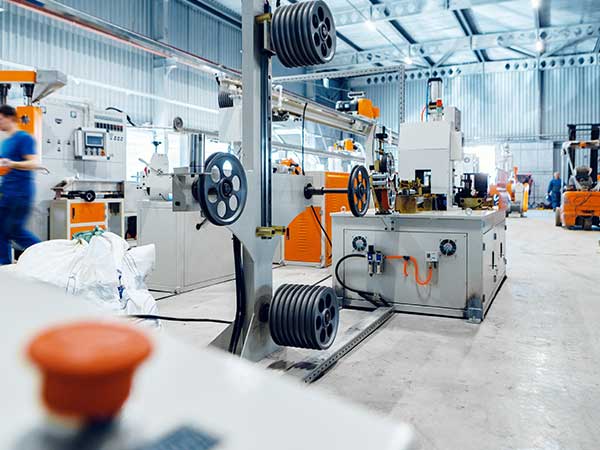
Manufacturing sales team reviewing RFQs and customer orders in BaseCloud CRM

Every RFQ answered and tracked

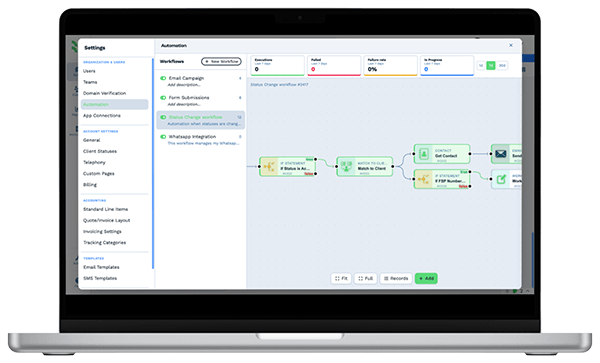
Example workflowFrom RFQ to repeat order

Clients who love our CRM system

Feel free to ask them about us.

  • Galetti
  • Quatro
  • Agriskills
  • Mastercare
  • Aluma
  • TutorsSA
  • Gawie le Roux Institute of Law
  • BNI
  • Vision Works
  • Intello Group

The buyer who waits a week for a quote buys elsewhere. The account nobody calls stops reordering.

RFQs come in by email, through the website, from trade-show badge scans and from dealers on the phone. The estimator is on the shop floor, so pricing waits. Quotes go out from a spreadsheet with last quarter's numbers, samples ship without a follow-up date, and a steady account quietly drops off because nobody noticed its usual order never arrived.

What BaseCloud CRM solves

What a manufacturing CRM should fix

  • Every RFQ logged against the right account, with drawings and specs attached
  • Quotes priced from one list, with volume breaks applied the same way every time
  • Sample shipments followed up with the buyer, not forgotten after they leave the dock
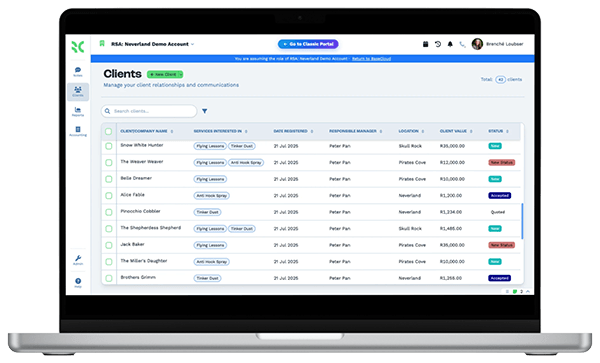
  • Distributor and dealer accounts organized by territory and rep
  • A prompt to the rep when a regular customer's next order is due
  • Open quotes and unpaid invoices visible to sales and accounts alike

How it works

From RFQ to the next purchase order

Four jobs a manufacturer's sales team handles every week, mapped to BaseCloud.

RFQs that never sit in an inbox

An RFQ from the website form or a shared rfq@ address creates or matches the account and lands with the right rep as a Workflow Note.

  • An Inbound Email workflow that reads RFQ emails and attaches them to the account
  • Drawings, specs and certificates stored on the account and previewed in the CRM
  • Round-robin or territory routing so each request has an owner

What you get

Built for selling what you make

The BaseCloud features a manufacturer's sales team leans on, in shop-floor terms.

  • A pricebook with volume pricing

    Parts, materials and tooling in a category tree with cost, sell price and bulk pricing. Import or update the whole list by CSV.

  • Orders and samples on every account

    Per-account tables for purchase orders and sample shipments, with PO number, part, quantity, ship date and column totals.

  • A shared RFQ mailbox

    A team mailbox every rep can send from, with email rules that file incoming RFQs. Replies match to the right account.

  • Sample and quote follow-up

    When a sample ships or a quote goes quiet, a workflow waits the days you set and creates a call task for the rep.

  • Dealer agreements signed online

    Send distributor agreements, NDAs and quote acceptances for signature, with signing order and a completion certificate.

  • Sales by product and money owed

    Dashboards for sales by product, quotes and invoices, and AR aging, so sales and accounts work from the same numbers.

The BaseCloud difference

Built in, not bolted on

Calling, texting, WhatsApp, email, quoting, e-signature and automation are part of BaseCloud, not add-ons from other vendors. One login, one client record, and no connectors to keep alive between separate subscriptions.

  • Phone system
  • SMS
  • WhatsApp
  • Gmail / Microsoft 365
  • Workflow automation
  • Quotes & invoices
  • E-signature

Manufacturing on BaseCloud

One RFQ, from inquiry to repeat business

This is an example of how a manufacturer could set up BaseCloud for new RFQs. It is a sample setup, not a customer story, and each step is a workflow you can change.

Example workflow

A packaging buyer sends an RFQ for custom printed boxes

A purchasing manager emails a drawing and a quantity range to your rfq@ address on a Tuesday afternoon. Here is how the request turns into a standing account.

  1. 1. RFQ captured

    An Inbound Email workflow matches the sender to an account, or creates one, saves the drawing and assigns the territory rep.

  2. 2. Rep alerted

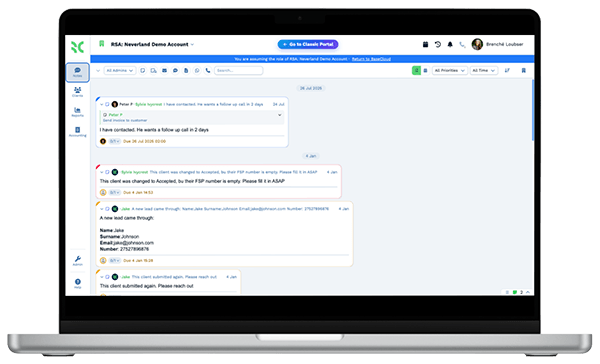
    The rep gets a Workflow Note with a due date and calls the buyer from the CRM. The call is recorded and summarized.

  3. 3. Quote sent

    The quote is built from the pricebook with the volume break for the larger run, then emailed with open tracking.

  4. 4. Sample shipped

    A sample row goes into the account's samples table, and a workflow schedules a follow-up call a week later.

  5. 5. Order invoiced

    The accepted quote converts to an invoice, which syncs to Xero or Sage for your accounts team.

  6. 6. Reorder prompted

    The expected next order date is set on the account. Before it arrives, the rep gets a task and the buyer gets a check-in email.

Your estimator prices from one list, and no regular customer goes quiet without someone noticing.

We pride ourselves on 5-Star Service

4.98 Google rating

Read our reviews on Google

FAQ

Manufacturing CRM questions

Does BaseCloud connect to our ERP or MRP system?
BaseCloud syncs contacts and invoices with Xero, and customers, quotes and tax invoices with Sage. There is no built-in connection to other ERP or MRP systems. Data can come in or go out by webhook or the public API, or by CSV import and export.
Does BaseCloud track inventory or production?
No. BaseCloud has no stock levels, bills of materials or production scheduling. It covers the customer side, from RFQs, quotes and dealer accounts to reorders and invoices, and works alongside the system that runs your shop floor.
Can we quote with volume pricing and our full parts list?
Yes. The pricebook holds cost and sell price for each item, bulk pricing for larger quantities, and bundles for kits or assemblies. You can import and update the whole list by CSV.
Can we manage distributors and dealers separately from end customers?
Yes. Use a dropdown field for account type and statuses for each stage, then filter, report and send bulk messages by type, territory or rep. Field-level permissions control what each team can see and edit.
Where do drawings and spec sheets go?
Files are stored on the account and can be previewed in the CRM. You can combine several PDFs into one pack for a quote, or add a password before sending.
Can reps work from the road or a trade show?
Yes. Reps can call from the BaseCloud Phone app on their cellphone, so calls are still recorded on the account. The CRM also installs on a phone as a web app for looking up accounts and adding notes.

Faster quotes. Steadier reorders.

Send us a typical RFQ and your price list, and we'll show you the quote, follow-up and reorder steps set up in BaseCloud.

See it for yourself

Watch the system in action