














4.98 Google rating

For independent advisors, RIAs and planning firms

CRM for Financial Advisors

BaseCloud keeps each household, its accounts and every conversation in one record. Annual reviews get scheduled on time, prospects are nurtured until they're ready, and client calls are recorded with a summary.

Weighing us up against what you run now? Grab the CRM comparison sheet.

Clients who love our CRM system

Feel free to ask them about us.

  • Galetti logo
  • Quatro logo
  • Agriskills logo
  • Mastercare logo
  • Aluma logo
  • TutorsSA logo
  • Gawie le Roux Institute of Law logo
  • BNI logo
  • Vision Works logo
  • Intello Group logo
  • Kern Insurance Brokers logo
  • KPC Brokers logo
  • Tiger Risk logo
  • Helfin Financial Services Group logo
  • EagleSure logo

Clients don't leave over returns. They leave when they stop hearing from you.

An advisor with 150 households can't remember every birthday, beneficiary change and RMD deadline. Review meetings slip a quarter, a prospect from last year's seminar never gets the second call, and when an assistant picks up the phone they can't see what was discussed last time.

What BaseCloud CRM solves

What an advisor CRM should fix

  • Household members, accounts and advisors on one record
  • Annual and semi-annual reviews scheduled automatically
  • Life events and key dates turned into timely check-ins
  • Prospects from seminars and referrals followed up for months
  • Client calls recorded and summarized for your notes
  • The whole team seeing the same history before they call

How it works

The client relationship, year round

Four jobs an advisory practice repeats every year.

Prospects nurtured until they're ready

Seminar sign-ups, referrals and web inquiries enter a nurture campaign with useful emails and a call task at the right moments.

  • Campaigns stop when the prospect books a meeting
  • Referral source stored, so you can thank the referrer
  • Email open and click tracking shows who is warming up
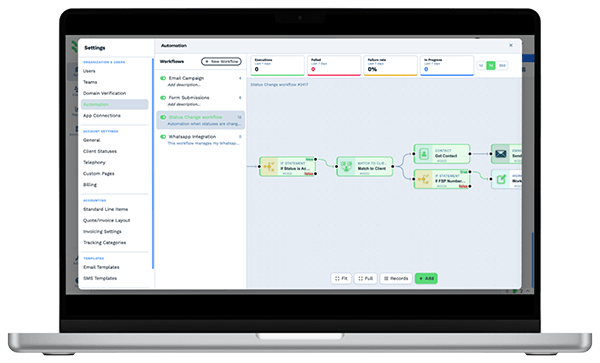
Automation workflow builder in BaseCloud CRM with run counts and connected steps

Security

Client records protected at every step

Advisers keep account numbers and beneficiaries for every household, and BaseCloud protects all of it. The permissions you set hold everywhere your team works, in the CRM, the Phone app, the API and connected AI apps like Claude and ChatGPT. BaseCloud is HIPAA compliant and we sign a BAA, so health and life cover details sit safely on the household too.

  • Field access levels hide a field, such as an account number, in lists, exports, reports, merge tags and PDFs
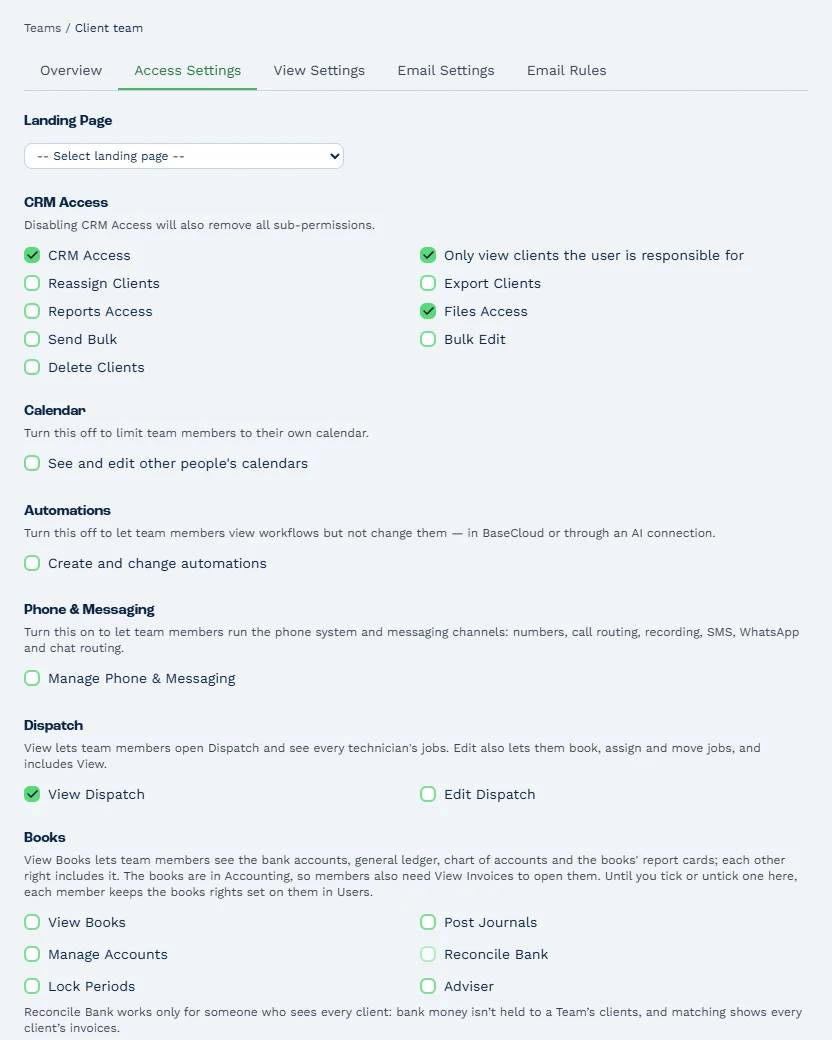
  • A team set to 'Only view clients the user is responsible for' sees its own households in every list, search, report and export
  • Audit logs of file access, database activity, sign-ins and admin changes, kept for six years in a tamper-proof archive
  • Keys and passwords stored encrypted, with two-factor sign-in and an activity log that records who changed what
  • Newsletters go out as Marketing email, which skips anyone who unsubscribed, while review confirmations go out as Transactional email, in line with POPIA, GDPR and CAN-SPAM
  • Every switch to Transactional is recorded in the Activity Log, with who made it and when
Team access settings with CRM access on and limited to clients the user is responsible for, with export, calendar, automation and books rights off

What you get

Built for relationship-driven practices

How an advisory practice uses BaseCloud day to day.

  • Households and accounts

    Link spouses and dependents to one household and track accounts, custodians and values in a table with totals.

  • Review and life-event triggers

    Client Date Triggers schedule reviews, birthday notes and age-based check-ins without a manual calendar.

  • Client calls recorded and summarized

    Calls are recorded and transcribed, with an AI summary and action points saved to the household.

  • Email synced and tracked

    Gmail or Microsoft 365 synced both ways, with open and click tracking on newsletters and follow-ups.

  • Review meetings in your calendar

    Google and Outlook calendars sync both ways, and a team calendar shows every advisor's week.

  • Practice reports

    Reviews completed, new households by source and activity by advisor on one dashboard.

Ready from your first sign-in

Set up for your industry in one click

The first time you sign in, you pick your industry and BaseCloud sets up your account in its words: your pipeline, client fields, Clients list columns, a table for what you track on each client, email and text templates signed with your business name, and an industry dashboard first in Reports.

Your Insurance (agencies, brokers and financial advisers) setup

Your pipeline

  1. New Lead
  2. Quoting
  3. Quote Sent
  4. Policyholder
  5. Lapsed
  • Table: Policies (Policy Type, Carrier, Policy Number, Premium, Renewal Date)
  • Industries that bill their clients get a price book filled with typical services and prices, switched on
  • Six or seven realistic sample clients, at least one in every status, so the dashboard shows real numbers from minute one
  • One click on Remove sample data clears the samples and keeps the setup, and your first real invoice is numbered 1
  • Rename or change anything in Settings, or ask Claude or ChatGPT connected to BaseCloud to reshape it

The BaseCloud difference

Built in, not bolted on

Calling, texting, WhatsApp, email, quoting, accounting, e-signature and automation are part of BaseCloud, not add-ons from other vendors. One login, one client record, and no connectors to keep alive between separate subscriptions.

  • Phone system
  • SMS
  • WhatsApp
  • Gmail / Microsoft 365
  • Workflow automation
  • Quotes & invoices
  • Accounting
  • E-signature

Financial Advisors on BaseCloud

One seminar prospect, from sign-up to first review

This is an example of how a planning firm can set up BaseCloud. Every step is a standard workflow you can change.

Example workflow

A couple nearing retirement who attended a retirement-income seminar

The couple signs up for a seminar through a Facebook lead ad. Here is how the firm follows through.

  1. 1. Sign-up captured

    The lead ad creates the household and sends the seminar confirmation with a reminder the day before.

  2. 2. Thank-you call

    After the seminar, the advisor gets a call task. The call is recorded and summarized.

  3. 3. Nurture campaign

    If they aren't ready, a monthly email series runs until they book a meeting.

  4. 4. Onboarded

    When they commit, the agreement is signed online and accounts go in the household table.

  5. 5. First review

    The next-review date is set. Six months later the review invitation goes out on its own.

  6. 6. Stay in touch

    Birthday notes and a check-in before the RMD age arrive without anyone keeping a list.

Advisors spend their time in meetings with clients. Reviews, reminders and follow-ups are scheduled for them.

In their words

Client stories

We pride ourselves on 5-Star Service

4.98 Google rating

Read our reviews on Google

FAQ

Financial advisor CRM questions

Does BaseCloud integrate with my custodian or portfolio software?
Yes. BaseCloud connects to custodian and portfolio software through automation workflows, webhooks and the public API. Account values and holdings can also be imported by CSV, so each household's record shows what it holds.
Can BaseCloud help with books and records?
Yes. Calls are recorded and transcribed, emails are logged on the client, and every client email can be saved as a PDF. Each email's More actions menu downloads it as an .eml file with its attachments or prints it, with Save as PDF, for your records. The activity log shows who changed what.
How do automatic review reminders work?
Each household has a next-review date. A Client Date Trigger fires before that date to remind the advisor and invite the client, and you can set different frequencies for different client tiers.
Can I manage households, not just individuals?
Yes. A client in BaseCloud can have several linked contacts, so spouses and dependents sit on one household with their own details.
Can I send newsletters and market updates?
Yes. Bulk email goes out from your own mailbox with templates, unsubscribe links and open and click tracking.

Every review on time. Every household looked after.

Tell us how your practice runs reviews and prospect follow-up, and we'll show you that process in BaseCloud.

See it for yourself

Watch the system in action