
CRM security
Security and trust at BaseCloud
BaseCloud is a secure CRM for regulated businesses, from medical practices to insurers. It is HIPAA compliant, and we sign a Business Associate Agreement (BAA) with your practice. This page gathers every safeguard in one place, ready to send to your compliance lead.
HIPAA
HIPAA compliant, and we sign a BAA
BaseCloud is HIPAA compliant, and we sign a Business Associate Agreement (BAA) with your practice. HIPAA is included on every plan, so a clinic or an insurance agency gets the same protection from day one.
How to get a BAA account
- Ask BaseCloud for a BAA, and we sign it with your practice.
- Our team switches your account to a BAA account, and the change is recorded in the activity log.
- Notifications turn private: phones and computers show ‘New message’, ‘Incoming call’, ‘Missed call’ or ‘Upcoming meeting’, with the full details inside BaseCloud.
- Every user sees a HIPAA notice in Settings > your user > Notifications, and Mark as done still works from the notification.
Certifications
HITRUST and CASA Tier 2
BaseCloud is HIPAA and HITRUST compliant. Every BaseCloud cloud resource is tracked live against the HITRUST/HIPAA control set, all 586 checks of it, so the scorecard is always current.
BaseCloud is also CASA Tier 2 certified. CASA is the independent Cloud Application Security Assessment that Google uses for apps that reach sensitive data, and it reviews how BaseCloud stores data and connects to outside services.
Permissions
Who sees what
Permissions apply on every action, in the CRM, the Phone app, the API and connected AI apps such as Claude and ChatGPT. A receptionist and a practice owner each see exactly what their role needs.
- A team set to ‘Only view clients the user is responsible for’ sees its own clients everywhere: lists, search, Inbox, reports, exports, and each client’s notes, emails, texts, files and recordings.
- Field access levels hide a field in lists, exports, reports, merge tags and quote and invoice PDFs.
- The Manage Phone & Messaging right decides who sets up phone numbers, texting and WhatsApp.
- Staff can open settings, templates, the price book and automations to see how they are set up. Where a right is missing, the view is read-only, with an amber banner naming the right needed.
- Every BaseCloud help page opens with a ‘Who can do this’ box, so admins know which right each task needs.
Audit logs
Audit logs and monitoring, kept for six years
When an auditor asks who opened a record, the answer comes from a log nobody can edit. BaseCloud keeps it for six years.
- Audit logs of file access, database activity, sign-ins, key vault reads and admin changes are kept for six years in a tamper-proof, write-once archive closed to the public internet.
- Every database statement a person runs is logged.
- Engineering leads are alerted the moment a sensitive admin change happens.
- BaseCloud staff reach the phone systems over a private network, and every sign-in is recorded by name.
- Staff access ends the moment someone leaves BaseCloud, open sessions included.
Data protection
Your data, protected at every layer
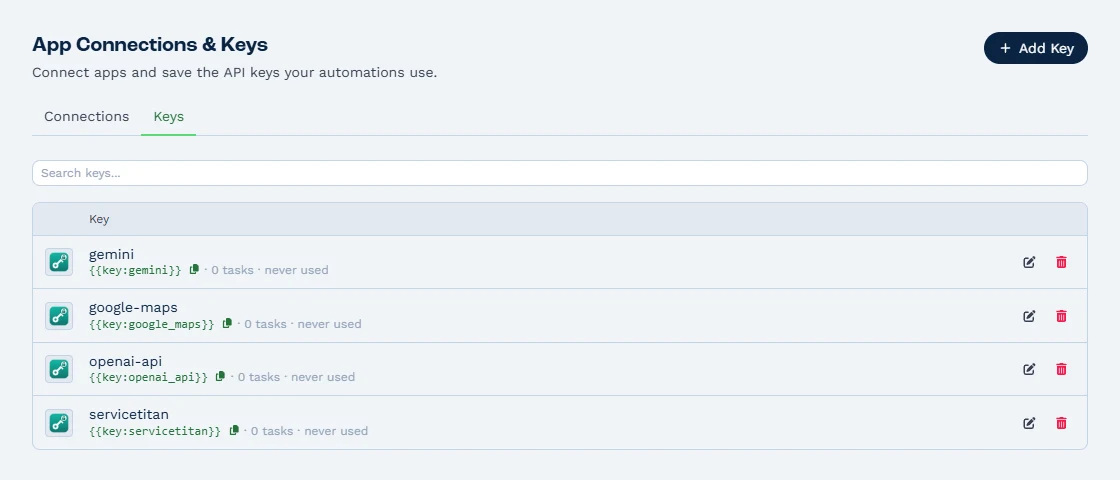
Save an API key or password once in Settings > App Connections & Keys, and your automation workflows use it without anyone seeing it again. The Keys list shows how many workflows use each key and when it was last used.
Microsoft Defender
Microsoft Defender protects the servers, the file store, the key vault and the database.
Malware scanning
Every file uploaded to BaseCloud is scanned for malware.
Geo-redundant backups
Both phone systems are backed up every day to geo-redundant storage, so your call setup is safe in more than one place.
Client data kept out of monitoring
Client details and messages stay out of system monitoring, which sees the shape of each request and nothing personal.
Encrypted Keys
API keys and passwords are stored encrypted and never shown again to anyone. Workflow run output withholds them too.
See how AI apps use your keys safelySee automation workflows
Payments
Payment links your customers can trust
After an independent security scan, BaseCloud hardened every page that touches money. Your customers pay a link that belongs to their invoice and nobody else’s.
Private payment links
Every payment link carries a private token unique to its invoice.
Protected pay page
The pay page is protected from being embedded in other websites.
Rate-limited pages
Sign-in, password reset, invite and payment pages are rate-limited against repeated attempts.
Carrier-signed call and text events
BaseCloud checks the carrier’s signature on every call and text event, so your call and text records are always genuine.
Locked paid invoices
Paid and reconciled invoices are locked, so invoices always match the money received and the bank.
Data retention
A defined retention period for workflow data
Workflow run history is kept for one year on every plan, then deleted automatically. Your compliance policy gets a clear answer, and nothing lingers longer than it should.
Need a permanent record of a result? A workflow copies any result to a Google Sheet or another system the moment it runs.
Email that respects unsubscribes and privacy law
Every bulk and automated email is marked Marketing or Transactional. Unsubscribes are respected under CAN-SPAM and GDPR, and South African senders are covered under POPIA too, while invoices and confirmations always get through.
- Marketing, the default, skips people who unsubscribed and adds an unsubscribe link.
- Transactional reaches every recipient and is for invoices, receipts, booking confirmations and account notices.
- Choosing Transactional shows a warning and switches once the person types CONFIRM. Every switch is recorded in the Activity Log.
- Each sending domain keeps its own reputation, so a campaign on a marketing domain never puts invoices from your main domain at risk.
AI
AI and your data
BaseCloud’s workflow AI runs on OpenAI and Anthropic, the providers covered by a BAA. Connected AI apps such as Claude and ChatGPT act with the signed-in person’s own rights, so an AI app sees exactly what that person sees.
- Connect any AI app whose provider has signed a BAA with your practice; Settings > AI Connections reminds every account of this before anything is connected.
- Every AI request is logged against the user and the app, and admins can switch AI connections off at any time.
- Saved keys stay hidden from the AI, which uses them by name inside your workflows.
FAQ
CRM security questions
Is BaseCloud HIPAA compliant?
Do you sign a BAA?
Where is data stored and backed up?
Who at BaseCloud can see my data?
How long is data kept?
Can I control what each team member sees?
Take your security review to a live account
Book a demo and we’ll walk your compliance lead through permissions and audit logs on a live account, then send your BAA for signing.