










4.98 Google rating

For CPA firms, bookkeepers and tax practices

CRM for Accountants and CPA Firms

BaseCloud runs the client side of your practice. New prospects get a proposal, document requests chase themselves through tax season, and monthly bookkeeping retainers are invoiced on schedule.

Weighing us up against what you run now? Grab the CRM comparison sheet.

Accountant managing client records and deadlines in BaseCloud CRM

Missing documents chased for you

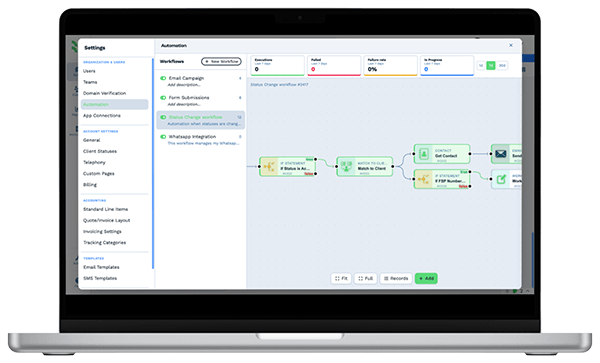
Example workflowA new client, onboarded

Clients who love our CRM system

Feel free to ask them about us.

  • Galetti
  • Quatro
  • Agriskills
  • Mastercare
  • Aluma
  • TutorsSA
  • Gawie le Roux Institute of Law
  • BNI
  • Vision Works
  • Intello Group

The work isn't the hard part. Getting the documents in is.

Every March and September the same thing happens. Half the clients haven't sent their 1099s, the reminder emails are going out one at a time from three inboxes, and nobody knows which partner last spoke to the client who just called. Outside tax season, new prospects wait days for a fee quote.

What BaseCloud CRM solves

What an accounting CRM should fix

  • Document requests that follow up on their own until the files arrive
  • Filing and extension deadlines stored per client, with reminders
  • Engagement letters sent, signed and saved without printing
  • Monthly retainers invoiced automatically, with online payment
  • One shared history of every call and email with the client
  • Prospects quoted quickly, with a follow-up until they decide

How it works

The client year, on schedule

Four jobs a practice repeats every year, each set up once in BaseCloud.

New clients onboarded in a day

A prospect form creates the client and the partner's follow-up task. Once you agree on scope, the engagement letter goes out for signature.

  • Fee proposal built as a quote from your service pricebook
  • Engagement letter signed online with a completion certificate
  • Welcome email with the document checklist attached

What you get

Built around the accounting year

What a practice uses BaseCloud for, in practice terms.

  • Automatic document reminders

    A campaign enrolls every client with missing documents and stops for each one when their files arrive.

  • Recurring invoices and online payment

    Bill retainers monthly, take card payments through Stripe and sync invoices to Xero.

  • Engagement letters signed online

    Send engagement letters with signing order for joint filers, one-time codes and an audit trail.

  • Entities and deadlines per client

    A table of entities, EINs and year-ends on each client, plus date fields for every filing deadline.

  • Email matched to the client

    Gmail or Microsoft 365 synced both ways. Every thread lands on the right client, with open tracking on reminders.

  • A phone system the whole team shares

    Calls ring in the browser or on the app, and each call is recorded on the client file.

The BaseCloud difference

Built in, not bolted on

Calling, texting, WhatsApp, email, quoting, e-signature and automation are part of BaseCloud, not add-ons from other vendors. One login, one client record, and no connectors to keep alive between separate subscriptions.

  • Phone system
  • SMS
  • WhatsApp
  • Gmail / Microsoft 365
  • Workflow automation
  • Quotes & invoices
  • E-signature

Accountants & Bookkeepers on BaseCloud

One new client, from inquiry to first invoice

This is an example of how a small firm can set up BaseCloud. Every step is a standard workflow you can change.

Example workflow

A small business owner who needs monthly bookkeeping and a tax return

The owner fills in your website form in January. Here is how the firm takes them on.

  1. 1. Inquiry captured

    The form creates the client and gives the partner a task to call within the hour.

  2. 2. Proposal sent

    The partner builds a fee proposal from the service pricebook and emails it from the CRM.

  3. 3. Letter signed

    The engagement letter goes out for e-signature. The signed copy is saved on the client.

  4. 4. Documents chased

    The client is enrolled in the document campaign and reminded weekly until everything is in.

  5. 5. Work assigned

    A preparer gets the return as a task with the filing deadline. The team calendar shows the load.

  6. 6. Retainer billed

    A monthly recurring invoice starts, synced to Xero, with a payment link in each email.

Partners spend their time advising. Reminders, letters and invoices go out without anyone chasing them.

We pride ourselves on 5-Star Service

4.98 Google rating

Read our reviews on Google

FAQ

Accounting CRM questions

Does BaseCloud integrate with QuickBooks?
Yes, through automation workflows that send customers, invoices and payments from BaseCloud to QuickBooks. BaseCloud also syncs contacts and invoices with Xero, and customers, quotes and invoices with Sage.
Can it replace our practice management software?
BaseCloud covers the client relationship side, including onboarding, document chasing, reminders, calls, email and billing. It doesn't prepare returns or keep a general ledger. Most firms keep their tax and accounting software and use BaseCloud around it.
How do automatic document reminders work?
You list the documents you need as fields on the client. A campaign sends reminders by email, text or WhatsApp on a schedule you set and stops for each client when their documents are marked received.
Can clients sign engagement letters online?
Yes. BaseCloud's e-signature handles several signers in order, one-time codes by text or email, and a completion certificate. The signed letter is saved on the client.
Who on the team can see client information?
Roles and teams control access, down to whether a user can view or edit a specific field. Sign-in supports two-factor authentication, and an activity log shows who changed what.

Fewer reminder emails. More finished returns.

Tell us how your firm runs tax season, and we'll show you document chasing, letters and billing set up in BaseCloud.

See it for yourself

Watch the system in action