










4.98 Google rating

For digital, performance and full-service agencies

Agency CRM for Marketing Agencies

BaseCloud is an agency CRM that runs your own new business and shows clients where their leads came from. Proposals go out from the CRM, retainers bill themselves each month, and every form fill and tracked call is tied to the campaign that paid for it.

Weighing us up against what you run now? Grab the CRM comparison sheet.

Clients who love our CRM system

Feel free to ask them about us.

  • Galetti
  • Quatro
  • Agriskills
  • Mastercare
  • Aluma
  • TutorsSA
  • Gawie le Roux Institute of Law
  • BNI
  • Vision Works
  • Intello Group

Clients don't fire agencies over clicks. They leave when nobody can show what the leads turned into.

Your team reports on impressions and cost per lead, but the client's sales team says the leads are poor and nobody can prove otherwise. Phone calls from ads go unmeasured. Google and Meta optimize for form fills, not for the leads that actually bought. Meanwhile your own pipeline lives in a spreadsheet, proposals go unchased, and retainer invoices are rebuilt by hand each month.

What BaseCloud CRM solves

What an agency CRM should fix

  • Every client lead stamped with its source, campaign and UTM values
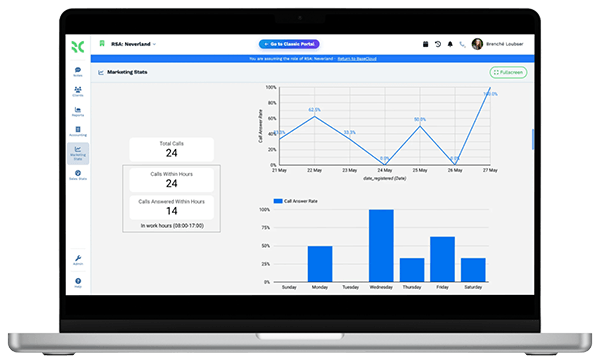
  • Calls from ads counted, recorded and credited to the right campaign
  • Qualified leads and sales sent back to Google Ads and Meta to train their bidding
  • Your own prospects tracked from discovery call to signed proposal
  • Retainers invoiced on the same day every month, without rebuilding the invoice
  • Results reports that show cost per lead and return by channel

How it works

From pitch to proof of results

Four jobs every agency juggles, and how BaseCloud handles each one.

Your own pipeline, worked properly

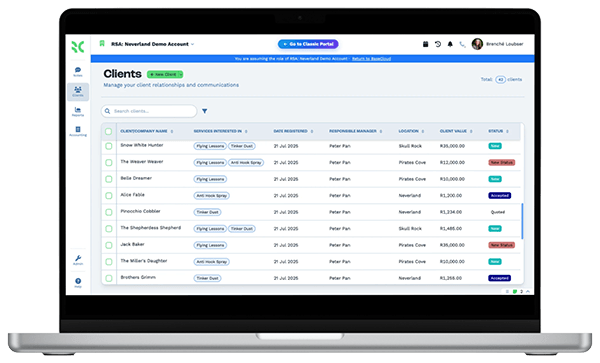
Inquiries from your website, referrals and LinkedIn outreach land on one record with their source. Each prospect moves across a kanban board by status.

  • Discovery calls booked into the strategist's calendar with a reminder text
  • Calls recorded and summarized, so the proposal reflects what the prospect said
  • A follow-up task when a prospect stays in one stage too long

What you get

What agencies use BaseCloud for

Six BaseCloud features in the terms an agency team uses with clients.

  • Offline conversions back to the platforms

    Send qualified leads and closed sales to Google Ads and the Meta Conversions API, so bidding learns from real outcomes.

  • Tracking numbers per campaign

    Give each ad, landing page or listing its own number in 15 countries. Every call is recorded and credited to its source.

  • Lead ads and forms in seconds

    Facebook and Instagram lead ads, website forms and webhooks create the lead and start the follow-up straight away.

  • Cost and ROI by channel

    Dashboards for funnel stages, cost per lead and return by channel. Export any report as a CSV for the monthly client review.

  • Retainers on recurring invoices

    Bill monthly management fees automatically, take card payments through Stripe, and track overdue retainers in AR aging.

  • Local SEO checks for clients

    A Google Maps rank grid and competitor snapshot for local clients, plus automatic or AI replies to new Google reviews.

The BaseCloud difference

Built in, not bolted on

Calling, texting, WhatsApp, email, quoting, e-signature and automation are part of BaseCloud, not add-ons from other vendors. One login, one client record, and no connectors to keep alive between separate subscriptions.

  • Phone system
  • SMS
  • WhatsApp
  • Gmail / Microsoft 365
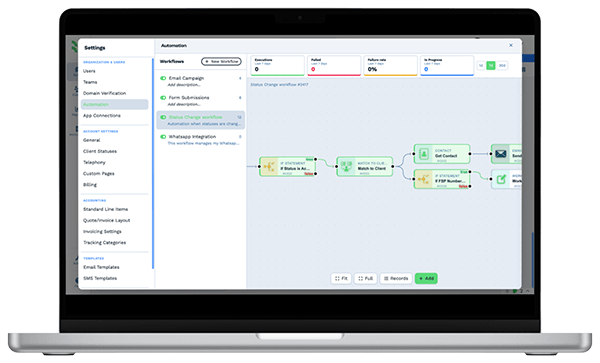
  • Workflow automation
  • Quotes & invoices
  • E-signature

Marketing Agencies on BaseCloud

One client campaign, from ad click to proven sale

This is an example of how an agency could set up a client's BaseCloud account for lead generation. It is a sample setup, not a customer story, and every step can be changed.

Example workflow

A roofing client running Google Ads and Facebook lead ads

Your client wants more inspection bookings and keeps asking which ads work. Here is how each lead is captured, followed up and reported back.

  1. 1. Lead captured

    A Facebook lead ad or landing page form creates the lead with its campaign and UTM values. Ad calls come in on a tracking number.

  2. 2. Client alerted

    Call Connect rings the client's sales rep and connects them to the homeowner. The call is recorded on the lead.

  3. 3. Lead qualified

    The rep marks the lead as qualified. A Meta Conversions API event and a Google Ads offline conversion are sent.

  4. 4. Job sold

    When the job is sold, the sale is recorded and sent back to Google Ads as an offline conversion.

  5. 5. Results reported

    The cost and funnel cards show spend, leads, qualified leads and sales by channel for the monthly review.

  6. 6. Retainer billed

    Your agency's recurring invoice for the month goes out, and the client pays by card.

The client sees which campaigns produced sales, and the ad platforms learn from them too.

We pride ourselves on 5-Star Service

4.98 Google rating

Read our reviews on Google

FAQ

Agency CRM questions

Can we white-label BaseCloud for our clients?
No. BaseCloud doesn't offer white labeling or reselling under your agency's brand. Many agencies use BaseCloud for their own new business, and set up a separate BaseCloud account for each client whose leads they handle.
Do our clients get their own login to see results?
There is no separate client-facing view inside your account. A client can have their own BaseCloud account with dashboards, or you can export report data to CSV for the monthly review. Workflows can also write lead data into Google Sheets.
How do offline conversions work with Google Ads and Meta?
When a lead reaches a stage you choose, such as qualified or sold, a workflow sends the event to Google Ads as an offline conversion and to Meta through the Conversions API. The ad platforms can then optimize toward leads that turned into business.
Can we track phone calls from our clients' ads?
Yes. You can assign a call tracking number to each ad, landing page or listing in 15 countries, including the US. Each call is recorded and logged with the campaign that drove it.
Can we send proposals and contracts for signature?
Yes. Generate the proposal from a PDF template, send it for e-signature with signing order and an email or text code, and have your director countersign. The signed copy and audit trail are saved on the client.
Does BaseCloud work with the other tools in our stack?
Webhook In and Webhook Out connect most tools that support webhooks, and there is a public API. Google Sheets, Google Docs, Facebook Lead Ads, Google Ads and Meta Ads actions are built in. For anything else, check whether the tool can send or receive a webhook.

Fewer reporting arguments. More renewed retainers.

Walk us through one client campaign, and we'll show you lead capture, call tracking and conversion uploads set up in BaseCloud.

See it for yourself

Watch the system in action