
Lead tracking and attribution
Lead tracking software that closes the loop with your ads
Know where every lead came from. Forms capture UTM and Google Analytics data, Facebook and Instagram Lead Ads arrive in seconds, and tracking numbers attribute calls. When a lead becomes a customer, send the conversion back to Meta and Google Ads.
See pricing · Every feature is on every plan.
At a glance
- UTM and Google Analytics data on every form lead
- Facebook and Instagram Lead Ads in seconds
- Call tracking numbers per source
- Meta Conversions API events
- Google Ads offline conversions
The problem
Ad platforms optimize for form fills unless you tell them what sold
Google and Meta only see the click and the form. They never hear which leads became paying customers, so they keep finding more of the leads that are easiest to get.
Leads with no source
Form leads arrive without the campaign, ad or keyword that produced them.
Slow Facebook leads
Lead Ads leads sit in a download until someone remembers to export them, and the lead goes cold.
Phone leads go uncounted
Calls never get credited to the ad that made the phone ring.
No feedback to the ad platforms
Bidding learns from form fills, not from the customers who actually paid.
How it works
How lead tracking works
Capture the source
BaseCloud forms (hosted or embedded), webhooks and the BaseCloud WordPress plugin record UTM values and Google Analytics data with each lead.
Bring in every channel
Facebook and Instagram Lead Ads arrive through their own trigger, calls through tracking numbers, and anything else through webhooks.
Follow up fast
Each new lead starts a workflow. Match or create the client, assign an owner, and ring a rep straight away with Call Connect.
Send the result back
When the lead buys, send a Conversions API event to Meta or upload an offline conversion to Google Ads.
What it does
Attribution from the first click to the sale
Lead capture, attribution and conversion feedback in one product, without a separate attribution tool to connect.
Website forms
Hosted or embeddable forms that create leads and start workflows.
UTM and Google Analytics capture
Source, medium, campaign and the other UTM values are saved with each lead, along with Google Analytics data.
Webhooks from any tool
Catch leads from any form builder, landing page tool or app with the Webhook In trigger.
Facebook and Instagram Lead Ads
Leads from Lead Ads arrive in seconds and start a workflow.
Call tracking numbers
A number per ad or source, in 15 countries, so phone leads are attributed too.
Call Connect for speed to lead
Rings your rep the moment a web form arrives and connects them to the lead.
Meta Conversions API
Send conversion events to Meta from a workflow when a lead moves forward or buys.
Google Ads offline conversions
Upload offline conversions, so Google Ads learns which clicks turned into customers.
Lead source reporting
Report dashboards can chart leads by origin, with funnel and cost cards beside them.
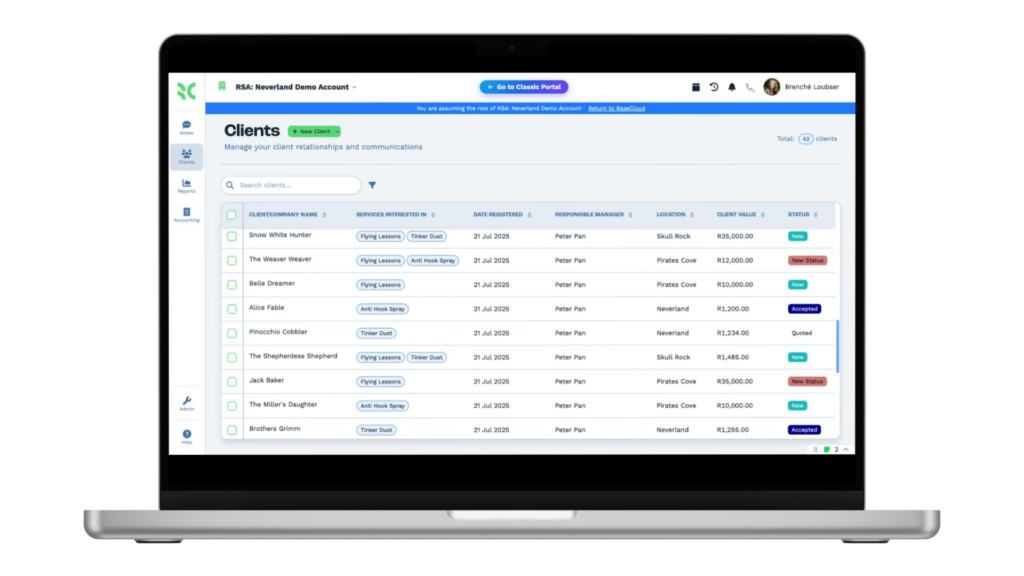
Every lead, with where it came from
The client list shows each lead with the fields you choose, such as the service they asked about, who owns them, their status and their value. Lead origin is saved on every record, so you can filter and report by it.
- Filter by source, status or owner
- Bulk actions on any filtered list
- Export to CSV whenever you need it
One platform
Lead tracking connects marketing to sales
Attribution is only useful if the follow-up happens. These features take a tracked lead the rest of the way.
Call tracking
Tracking numbers in 15 countries that show which ad made the phone ring.Call Connect
Rings your rep the moment a web form arrives and connects them to the lead.Automation workflows
A visual workflow builder with 15 triggers and 49 actions.Google reviews and local rank
Act on every new Google review and track your Google Maps ranking.Quotes and invoicing
Quotes, invoices, recurring billing, a pricebook and online payment.
Popular with
Learn more
- Case study: closing the lead-tracking feedback loopUTM parameters and Google Ads in practice.
- BaseCloud WordPress pluginsIncluding the UTM tracking plugin.
- Best CRM for lead trackingFrom the blog.
FAQ
Questions buyers ask
What does lead tracking software do?
Does BaseCloud capture UTM parameters?
Can I connect Facebook and Instagram Lead Ads?
What is the Meta Conversions API, and why send events to it?
Can I import offline conversions into Google Ads?
Can I track phone leads as well as forms?
Know where your customers come from
Book a demo to follow a lead from the ad click to the client record to the conversion upload.