
BaseCloud Books
A CRM with accounting built in: BaseCloud Books
BaseCloud includes full double-entry accounting: chart of accounts, bank feeds and reconciliation, journals, trial balance and lock dates, built from your invoices automatically. Copy your chart of accounts and tax rates from Xero, QuickBooks or Sage in one step, enter your opening balances, and BaseCloud works out what every customer owes from your invoices.
See pricing · Every feature is on every plan.
At a glance
- A double-entry general ledger written by every invoice
- Bank feeds and reconciliation
- Trial balance on any date
- Lock dates and year end
- Ready-made US and South African charts
The problem
Re-keying invoices into accounting software costs you every week
Your invoices live in the CRM and your books live somewhere else. Someone copies every invoice and payment across, and by month end the two disagree.
Every invoice typed twice
Invoices and payments are re-keyed into separate accounting software, one at a time.
Bank lines matched by hand
Matching transfers and card payouts to invoices takes hours of ticking and searching.
Who actually owes what?
The CRM shows an invoice as paid while the accounting package shows it open, and the customer gets the wrong reminder.
Two systems for one set of customers
You pay for a CRM and an accounting package that both store the same customers and the same invoices.
How it works
Set up BaseCloud Books in four steps
Our team sets up Books with you and your bookkeeper.
Choose your chart and start date
Start from a ready-made US or South African chart, with US sales tax or 15% VAT set up, or copy your own chart of accounts and tax rates from your current package.
Match line codes to accounts
Point each line code you invoice with to its account, so every sale posts to the right place.
Enter opening balances
Type in your opening balances. BaseCloud works out what every customer owes from your invoices.
Review and go live
Check the setup and switch Books on. From then on every invoice, payment, credit note and refund writes itself into the ledger.
What it does
Full double-entry accounting, inside your CRM
Every invoice, payment, credit note and refund writes itself into a double-entry general ledger, so nobody re-keys invoices into separate software.
General ledger and chart of accounts
Use a ready-made US or South African chart, or your own chart copied across. Every journal links back to the invoice or payment it came from.
- Each account's transactions with a running balance
- Nightly balance checks
Bank feeds and statements
Bring statements in from CSV, OFX, QFX or QIF files, or connect a live bank feed that updates every hour for US banks.
Reconciliation that suggests the match
BaseCloud suggests the match for every bank line. A customer's transfer matches to the invoice it pays in one click, and a Stripe or Paystack payout matches to the payments inside it with the fees booked for you.
- Bank rules fill in everyday lines such as bank fees and subscriptions
Spend and receive money
Record spending and money received, or move money between accounts, with sales tax or VAT worked out for you.
Manual journals
Post your accountant's adjustments with the tax worked out, and undo any journal with one click on Reverse.
Lock dates and year end
Two lock dates, one for your team and one for your accountant, close a month or a filed year. Year end works out retained earnings automatically.
Trial balance and reports
Run a trial balance on any date. The Reports tab shows profit for the year, what customers owe, sales tax owed and cash in the bank.
Part payments and customer credit
Record part payments, deposits, prepayments and overpayments with the amount, method and reference. Extra money becomes customer credit and is used on the next invoice.
- One payment across several invoices with Fill oldest first
- A balance box at the top of each client's Accounting tab
Credit notes and write-offs
Credit a whole invoice or chosen lines, give goodwill credit, write off a bad debt with the tax reversed, or refund a sale. Credit notes share one number sequence with your quotes and invoices.
Aged customer statements
Send an activity statement with a running balance, or an outstanding statement aged current, 1-30, 31-60, 61-90 and 90+ days, as a PDF or by email in one click.
- Paid and reconciled invoices are locked, so invoices always match the bank
- Every change posts a reversal and a new entry, so the books are their own audit trail
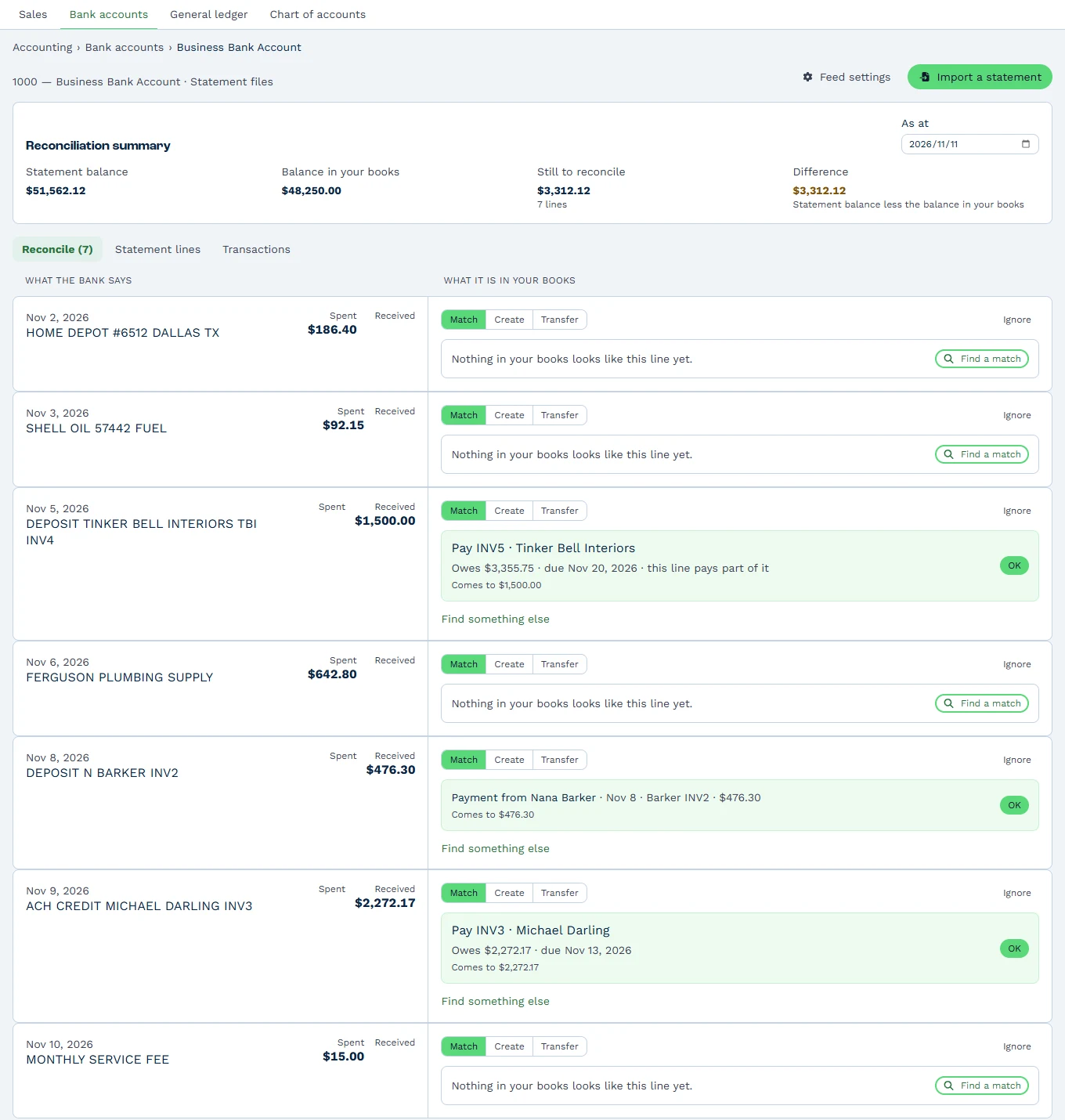
Reconciliation that suggests the match
Every imported bank line comes with a suggested match. A customer's transfer matches to the invoice it pays with one click on OK, and anything without a suggestion offers Find a match.
Stripe and Paystack payouts match to the payments inside them with the fees booked for you, and bank rules fill in everyday lines such as bank fees and subscriptions.
- Statement balance, balance in books and what is still to reconcile
- Suggested matches for part payments, recorded payments and paid invoices
- Bank rules for everyday lines
General ledger and chart of accounts
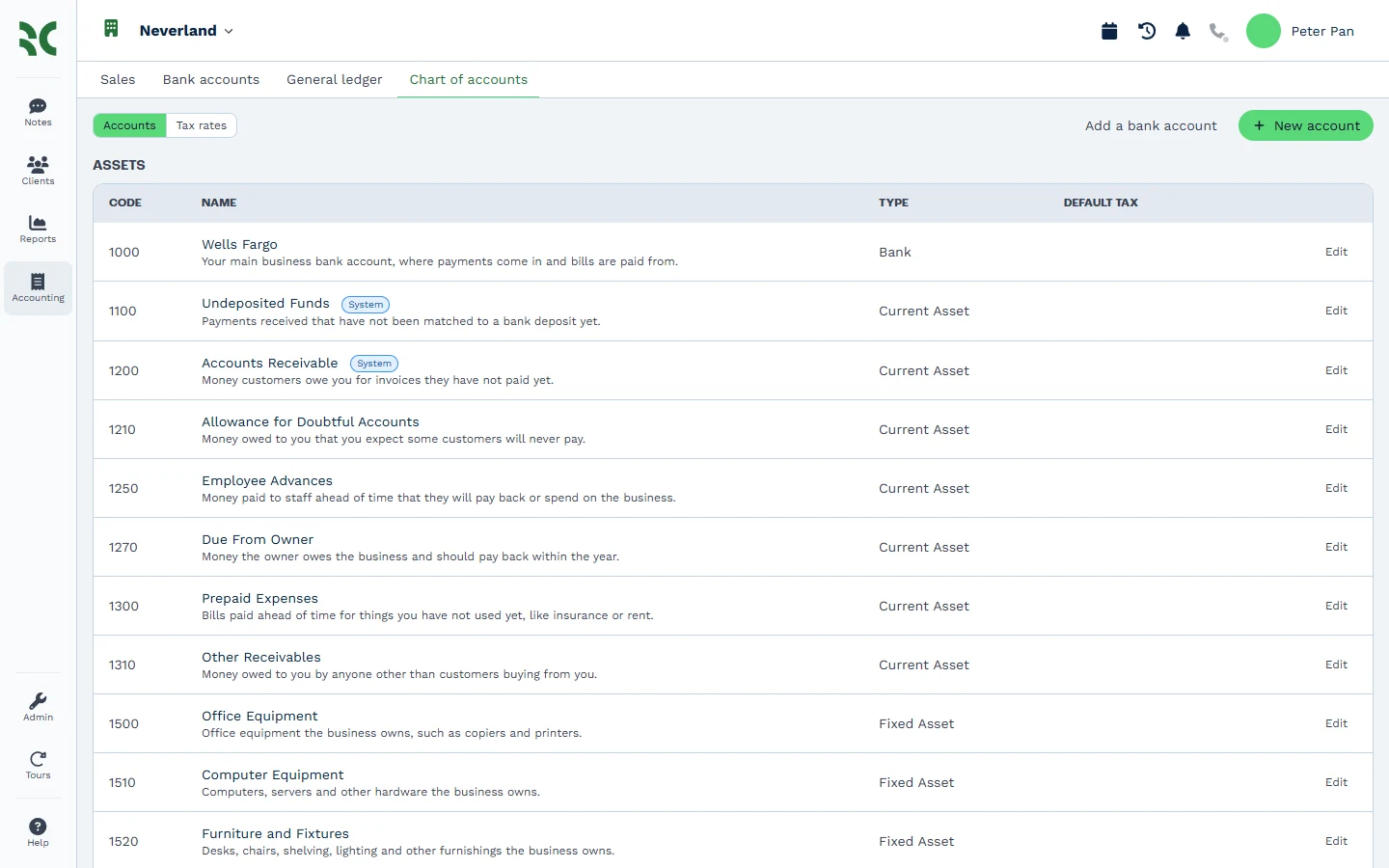
Start from a ready-made US or South African chart, or copy your own across. Every account has a code, a plain-English description and a type.
Every journal links back to the invoice or payment it came from, and each account shows its transactions with a running balance.
- Ready-made US and South African charts
- Running balance on every account
- Nightly balance checks
Trial balance and reports
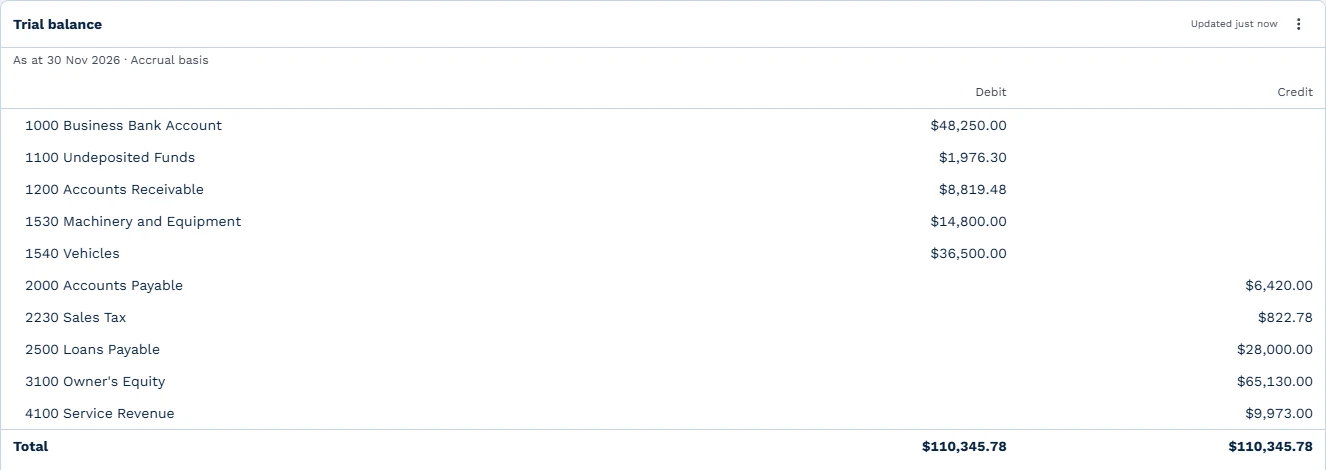
Run a trial balance on any date, on an accrual basis, with every account's debits and credits side by side.
The Reports tab shows profit for the year, what customers owe, sales tax owed and cash in the bank.
- Trial balance on any date
- Profit, receivables, sales tax and cash at a glance
One platform
Books runs on the rest of BaseCloud
Quotes become invoices, invoices write the ledger, and automations act on every payment the moment it lands.
Quotes and invoicing
Quotes, invoices, recurring billing, a pricebook and online payment.CRM quoting and pricebook
Build branded quotes from saved services or a full catalog with bundles and margin.Automation workflows
A visual workflow builder with 16 triggers and 50 actions.Claude and ChatGPT connector
Ask Claude, ChatGPT or any MCP app about your clients, send messages and build workflows in plain words.
Popular with
Learn more
- Set up BaseCloud BooksThe four-step setup, from chart of accounts to opening balances.
- Bank reconciliation and bank rulesSuggested matches, and bank rules for everyday lines.
- Customer statementsActivity and aged statements, by PDF or email.
- A QuickBooks alternative inside your CRMFrom the blog.
FAQ
Questions buyers ask
Can BaseCloud replace QuickBooks or Xero?
Does it do bank reconciliation?
Can my bookkeeper use it?
What moves over from Xero, QuickBooks or Sage?
Can customers part-pay online?
Does Books handle US sales tax and South African VAT?
Run your books where you invoice
Book a demo and we'll walk through BaseCloud Books on a live account, from the chart of accounts to a reconciled bank statement.