









4.98 Google rating

For residential and commercial roofing contractors

Roofing CRM for Roofers and Contractors

BaseCloud is a roofing CRM with the phone system, texting, estimates and e-signature built in. Every leak call and inspection request lands on the homeowner's record, estimates are followed up until there's an answer, and each job moves across a board from signed contract to final invoice.

Weighing us up against what you run now? Grab the CRM comparison sheet.

Roofer with a tool belt nailing shingles onto a house roof with a nail gun

Every inspection request called back

Example workflowFrom leak call to finished roof

Clients who love our CRM system

Feel free to ask them about us.

  • Galetti
  • Quatro
  • Agriskills
  • Mastercare
  • Aluma
  • TutorsSA
  • Gawie le Roux Institute of Law
  • BNI
  • Vision Works
  • Intello Group

After a hailstorm, every roof on the street needs an estimate. The roofer who calls back first gets the job.

Storm weeks fill the phone while the crew is on a roof and the estimator is on a ladder. Inspection requests come in by call, text, website form and yard-sign number, and half of them are never called back. Estimates go out and nobody checks how they landed. Claim numbers and adjuster names live in a notebook, and the homeowner hears nothing between signing the contract and the day the shingles arrive.

What BaseCloud CRM solves

What a roofing CRM should fix

  • Every call and web lead answered or called back, even in a storm week
  • Inspections on the estimator's calendar, with a reminder sent to the homeowner
  • Estimates built from one pricebook and followed up until the homeowner decides
  • Contracts signed online before materials are ordered
  • Claim number, adjuster and job stage on the customer, not in a notebook
  • A review request after every finished roof

How it works

From the first call to the final invoice

Four jobs a roofing office handles every week, set up once in BaseCloud.

Every roofing lead called back

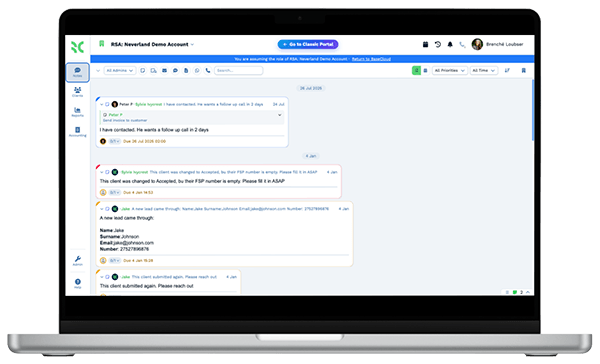
A phone call, website form or Facebook lead ad creates the customer and records where it came from. The estimator for that area is notified, and a missed call gets a text straight away.

  • Call Connect rings the estimator the moment a web form arrives
  • Tracking numbers for yard signs, door hangers and Google Ads
  • Calls recorded and summarized on the customer

What you get

Built for the roofing office

The BaseCloud features a roofing contractor uses every day, in roofing terms.

  • Know which marketing makes the phone ring

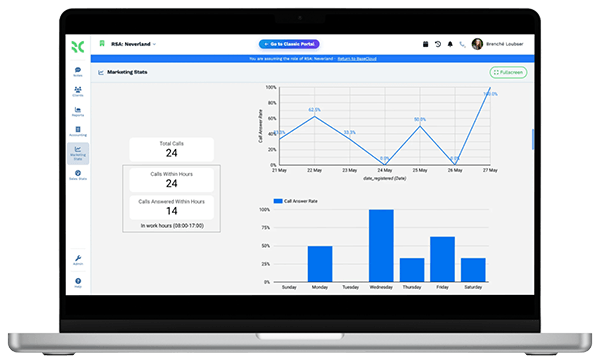
    A tracking number on yard signs, door hangers, truck wraps and Google Ads shows which ones bring in inspection requests.

  • Estimates and invoices from your pricebook

    Materials and labor with cost and price, bundles for common jobs, and an accepted estimate turned into a deposit or final invoice.

  • Contracts signed at the kitchen table

    Send the contract by text or email. A one-time code confirms the signer, and the signed copy is saved with an audit certificate.

  • A Jobs table and board for every roof

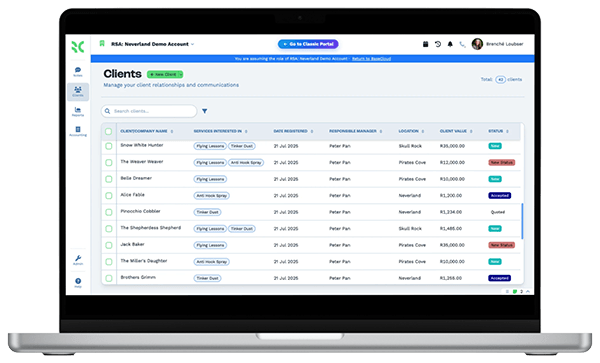
    Roof type, squares, claim number, adjuster and stage per job, shown as a board the whole office can follow.

  • Texts from your business number

    Appointment reminders, estimate follow-ups and crew arrival notices by text, with US 10DLC registration handled for you.

  • Google reviews and rank grid

    Ask for a review after each finished roof, reply to new ones and see your Google Maps ranking across your service area.

The BaseCloud difference

Built in, not bolted on

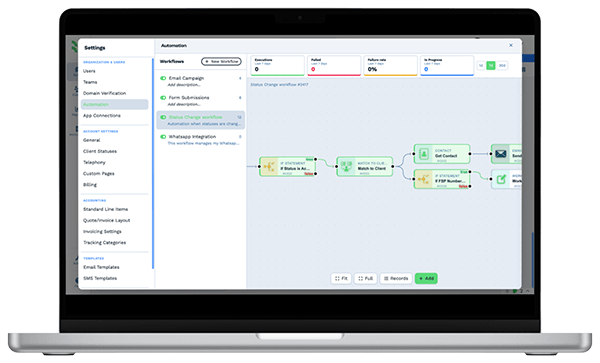
Calling, texting, WhatsApp, email, quoting, e-signature and automation are part of BaseCloud, not add-ons from other vendors. One login, one client record, and no connectors to keep alive between separate subscriptions.

  • Phone system
  • SMS
  • WhatsApp
  • Gmail / Microsoft 365
  • Workflow automation
  • Quotes & invoices
  • E-signature

Roofers & Roofing Contractors on BaseCloud

One leak call, from voicemail to five-star review

This is an example of how a roofing contractor can set up BaseCloud, not a customer story. Every step is a standard workflow you can change.

Example workflow

A homeowner who finds a ceiling stain two days after a hailstorm

The homeowner sees your yard sign on a neighbor's lawn and calls the number on it while your estimator is on another roof. Here is how that call becomes a finished job.

  1. 1. Call caught

    The call is missed, so the homeowner gets a text within seconds. The tracking number records the yard sign as the source.

  2. 2. Inspection booked

    The office calls back and books the inspection in the estimator's calendar. A reminder text goes out the day before.

  3. 3. Estimate sent

    The estimator saves roof photos to the customer and builds the estimate from pricebook bundles.

  4. 4. Followed up

    The homeowner is waiting on the insurance adjuster. A text follows on day 3 and a call task on day 7.

  5. 5. Contract signed

    The homeowner accepts and signs the contract online. The deposit invoice is paid by card through Stripe.

  6. 6. Roof finished

    The job card moves to Complete. The final invoice goes out, and a text asks for a Google review.

The estimator stays on roofs. Callbacks, follow-ups, signatures and review requests run on schedule.

We pride ourselves on 5-Star Service

4.98 Google rating

Read our reviews on Google

FAQ

Roofing CRM questions

What does a roofing CRM replace?
It replaces the spreadsheet of leads, the separate phone and texting apps, the estimate template and the e-signature tool. BaseCloud keeps calls, texts, emails, estimates, contracts and invoices on one customer record. It doesn't replace your accounting software. Invoices sync to Xero and Sage, and QuickBooks connects through automation workflows.
Does BaseCloud measure roofs or order materials?
No. BaseCloud has no aerial roof measurement, takeoff tool or supplier ordering. You measure the roof the way you do today, then build the estimate in BaseCloud from your own pricebook of materials and labor. Measurement reports and photos can be saved in the customer's files.
Can it track insurance claim jobs?
Yes, as records you keep yourself. Add custom fields or a Jobs table for the claim number, insurance company, adjuster and approved amount, and follow each claim job on a board. There is no integration with Xactimate or with insurance carriers, so estimates written there aren't imported.
Does it schedule and dispatch crews?
BaseCloud doesn't have a dispatch board, route planning or GPS tracking. Inspections and install dates go in each person's Google or Outlook calendar, a team calendar shows everyone's week side by side, and the job board shows which roofs are scheduled, in progress and complete.
Can we text homeowners from our business number?
Yes. Two-way texts go out from your business numbers and replies land on the customer. For US numbers BaseCloud registers your 10DLC brand and campaign for you, which carriers require before they deliver business texts reliably.
How much does BaseCloud cost for a roofing company?
Plans and usage rates for calls and texts are listed on the pricing page. Every plan includes every feature, so estimates, e-signature, the phone system and automation aren't paid add-ons.

Every lead called back. Every estimate followed up.

Tell us how your office handles leads, estimates and jobs today, and we'll show you that setup in BaseCloud.

See it for yourself

Watch the system in action