










4.98 Google rating

For residential and commercial solar installers

Solar CRM for Installers

BaseCloud follows a solar lead from the Facebook ad to permission to operate. New leads get a call in seconds, site surveys are booked and confirmed, and homeowners hear from you at every stage of permitting and install.

Weighing us up against what you run now? Grab the CRM comparison sheet.

Clients who love our CRM system

Feel free to ask them about us.

  • Galetti
  • Quatro
  • Agriskills
  • Mastercare
  • Aluma
  • TutorsSA
  • Gawie le Roux Institute of Law
  • BNI
  • Vision Works
  • Intello Group

Solar leads are expensive. Letting one cool off for a day wastes the spend.

You pay for every lead from Facebook, Google and lead vendors, and the homeowner filled in three other installers' forms the same evening. Then the sale takes weeks of consults, utility bills and financing questions, and after the contract is signed the homeowner hears nothing during the months of permits and interconnection.

What BaseCloud CRM solves

What a solar CRM should fix

  • Ad and vendor leads called within a minute, day or evening
  • Utility bills and roof photos collected on the homeowner record
  • Site surveys and consults booked with reminders
  • Proposals followed up through the long decision
  • Homeowners updated automatically through permitting, install and PTO
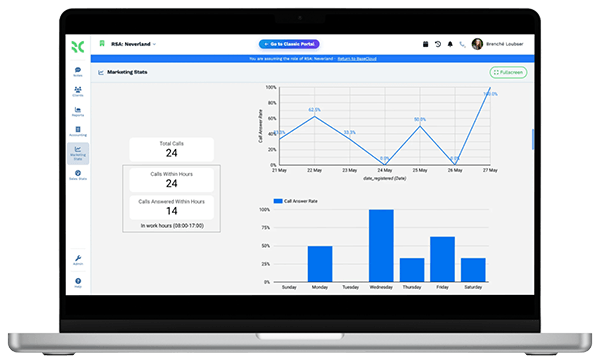
  • Cost per lead and per install by ad campaign

How it works

From lead ad to PTO

The four stages every residential solar job passes through.

Leads called while they're still interested

Facebook lead ads, web forms and vendor leads by webhook arrive in the CRM and start a call straight away.

  • Call Connect rings the setter and dials the homeowner
  • Monthly bill and roof type captured in custom fields
  • Leads spread across setters by round robin

What you get

Built for the solar sales cycle

The parts of BaseCloud a solar company uses most.

  • Speed to lead on every ad

    Call Connect rings a setter the moment a lead form lands and connects them to the homeowner.

  • Lead ads and vendor leads in

    Facebook lead ads and web forms connect directly; lead vendors can post by webhook.

  • Cost per install by campaign

    UTM capture and conversions sent back to Google Ads and Meta, so ad platforms learn which leads install.

  • Proposals from a pricebook

    System bundles with cost and price, presented on a tablet, then turned into deposit and progress invoices.

  • Install-stage updates

    Each board stage sends the homeowner the right message and creates the next task for your team.

  • Texting homeowners

    Two-way texts from your business number, with US 10DLC registration handled by BaseCloud.

The BaseCloud difference

Built in, not bolted on

Calling, texting, WhatsApp, email, quoting, e-signature and automation are part of BaseCloud, not add-ons from other vendors. One login, one client record, and no connectors to keep alive between separate subscriptions.

  • Phone system
  • SMS
  • WhatsApp
  • Gmail / Microsoft 365
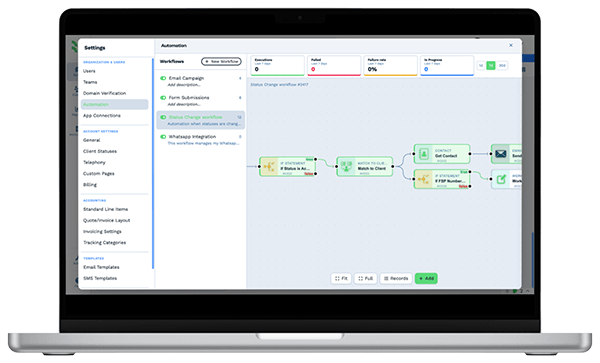
  • Workflow automation
  • Quotes & invoices
  • E-signature

Solar Companies on BaseCloud

One homeowner, from lead ad to PTO

This is an example of how a solar installer can set up BaseCloud. Every step is a standard workflow you can change.

Example workflow

A homeowner with a high summer electric bill who responds to a Facebook ad

The homeowner fills in your lead form at 8 pm on a Sunday. Here is how the job moves.

  1. 1. Called in a minute

    Call Connect rings the on-duty setter. The call is recorded and the monthly bill noted.

  2. 2. Survey booked

    The survey goes into the surveyor's calendar. A text asks for a photo of the utility bill.

  3. 3. Proposal presented

    The consultant builds the system from the pricebook and presents it at the kitchen table.

  4. 4. Decision followed up

    The family wants time. Follow-ups run for three weeks until they sign.

  5. 5. Progress updates

    Permit, install and inspection stages each send the homeowner a text.

  6. 6. Conversion reported

    The signed contract is sent back to Meta as a conversion, and a referral request goes out after PTO.

Your team spends its time selling and installing. Callbacks, follow-ups and progress updates run on their own.

We pride ourselves on 5-Star Service

4.98 Google rating

Read our reviews on Google

FAQ

Solar CRM questions

Can BaseCloud take leads from lead vendors?
Yes, if the vendor can post leads by webhook or email. Webhook leads create contacts directly, and lead emails can be read by an Inbound Email workflow. Facebook lead ads and website forms connect without a vendor.
Does it integrate with Aurora or OpenSolar?
There is no built-in connection to solar design software. Designs and proposals from those tools can be saved as files on the homeowner, and data can be sent in by webhook or the API where the tool supports it.
Can we send conversions back to Facebook and Google?
Yes. BaseCloud can send events to the Meta Conversions API and upload offline conversions to Google Ads, so the ad platforms learn which leads became sales.
Can homeowners get automatic project updates?
Yes. When a project moves to a new stage on the board, a workflow can text or email the homeowner and create the next task for your team.
Can setters and closers work from their phones?
Yes. The BaseCloud Phone app makes and takes calls on your business numbers, and calls are recorded and summarized on the homeowner.

Every lead called. Every homeowner updated.

Tell us how your sales and install team works, and we'll show you that process set up in BaseCloud.

See it for yourself

Watch the system in action