














4.98 Google rating

For alarm, CCTV, access control and guard service companies

CRM for Security Companies

BaseCloud runs your whole security business, from the first site survey to the monthly monitoring invoice. Site surveys are booked and followed up, installs are quoted from your pricebook, and monitoring contracts are billed every month and renewed on time.

Weighing us up against what you run now? Grab the CRM comparison sheet.

Clients who love our CRM system

Feel free to ask them about us.

  • Galetti logo
  • Quatro logo
  • Agriskills logo
  • Mastercare logo
  • Aluma logo
  • TutorsSA logo
  • Gawie le Roux Institute of Law logo
  • BNI logo
  • Vision Works logo
  • Intello Group logo
  • Kern Insurance Brokers logo
  • KPC Brokers logo
  • Tiger Risk logo
  • Helfin Financial Services Group logo
  • EagleSure logo

The install is a one-time sale. The monitoring contract is the business.

A business owner asks about cameras after a break-in. A surveyor visits, a quote is emailed and nobody follows up. Monitoring customers are billed from a spreadsheet, contract end dates are missed, and when a customer calls about a fault, whoever answers can't see what equipment is on site.

What BaseCloud CRM solves

What a security company CRM should fix

  • Survey requests answered the same day and booked into a calendar
  • Quotes for cameras, panels and access control built from one pricebook
  • Every site's equipment, zones and install dates on record
  • Monitoring and service contracts billed automatically every month
  • Contract renewals and upgrade offers started before the end date
  • Service calls logged and assigned with the site history in view

How it works

From survey to monitored site

The four jobs that bring in and keep security customers.

Surveys booked and followed up

An inquiry creates the prospect and books the site survey in the surveyor's calendar. Reminders cut the no-shows.

  • Commercial or residential, site type and risk in custom fields
  • Survey photos and floor plans saved as files
  • A quote task created once the survey is done
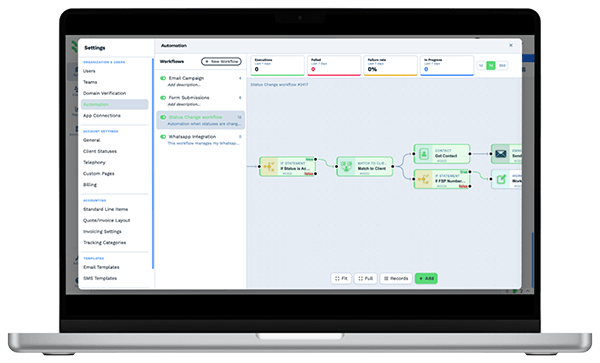
Automation workflow builder in BaseCloud CRM with run counts and connected steps

AI receptionist

Service calls and new inquiries answered 24/7

The AI receptionist answers every call, day and night, from the business facts you write in, such as the systems you install and the areas you cover. It confirms who is calling before it shares anything about a site, then books the install or call-out while the customer is on the line and texts them the booking. Whenever a caller needs more, the call carries on to the next step in your flow, such as your on-call technician, so nobody is ever cut off.

  • Installs and call-outs booked on your team's calendars or as Dispatch jobs
  • Messages reach the right person's Inbox as call-back notes
  • Take over from the AI assistant with one click, from the Calls column
  • Returning customers are greeted by first name, and staff notes and anything marked sensitive stay private

For your technicians

Your installers and technicians run their day from My day

Installers open My day in their phone browser and see the day's installs and call-outs in start order, the next one shown in full. Each status, from On my way to Done, is a single button that records the time and updates your dispatch board, and an automation can text the customer when the installer sets off. On site, the installer works through the job checklist, adds photos of the cameras and panel, gets the customer's signature on the phone and takes payment.

  • A checklist per job type, such as Zones tested and Photos taken, with Required steps that hold Done until they are ticked
  • Waiting for parts holds the job while a recorder is on its way, and Resume starts it again
  • Directions to the site and a call or text to the customer from the job, with the gate code and previous visits on screen
  • A Needs a return visit flag creates the follow-up job, linked to the first, for the office to schedule

What you get

Built for security installers and monitoring

The parts of BaseCloud a security company uses most.

  • Equipment and sites per customer

    A Sites table and an Equipment table with cameras, panels, zones, serial numbers and install dates.

  • Install quotes and recurring billing

    Pricebook bundles for installs, then monthly recurring invoices for monitoring and service.

  • Renewal and follow-up triggers

    Contract end dates start renewal tasks, and unanswered quotes get a follow-up sequence.

  • Calls routed to sales or service

    A menu splits new inquiries from service calls. Ring groups and follow-me cover after-hours.

  • Calls recorded and summarized

    Service and sales calls are recorded and transcribed, with action points on the customer.

  • Recurring revenue at a glance

    Dashboards for monthly billing, contracts up for renewal and quotes waiting on an answer.

The BaseCloud difference

Built in, not bolted on

Calling, texting, WhatsApp, email, quoting, accounting, e-signature and automation are part of BaseCloud, not add-ons from other vendors. One login, one client record, and no connectors to keep alive between separate subscriptions.

  • Phone system
  • SMS
  • WhatsApp
  • Gmail / Microsoft 365
  • Workflow automation
  • Quotes & invoices
  • Accounting
  • E-signature

Security Companies on BaseCloud

One business owner, from break-in to monitored site

This is an example of how a security company can set up BaseCloud. Every step is a standard workflow you can change.

Example workflow

A retail store owner who wants cameras and monitoring after a break-in

The owner calls on Monday morning. Here is how the call becomes a monthly customer.

  1. 1. Call routed

    The menu sends the call to sales. It is recorded and a new prospect created.

  2. 2. Survey booked

    The surveyor's calendar gets the visit. The owner gets a reminder the day before.

  3. 3. Quote sent

    Cameras, a recorder and installation are quoted from the pricebook the same afternoon.

  4. 4. Install scheduled

    The owner accepts. The equipment is logged in the Sites and Equipment tables.

  5. 5. Monitoring billed

    A monthly recurring invoice starts, paid by card, with the contract end date stored.

  6. 6. Renewal started

    Ninety days before the end date, the account manager gets a renewal and upgrade task.

Your team spends its time on surveys, installs and service. Billing, renewals and follow-ups are handled for them.

In their words

Client stories

We pride ourselves on 5-Star Service

4.98 Google rating

Read our reviews on Google

FAQ

Security company CRM questions

Does BaseCloud connect to our alarm monitoring software?
Yes. BaseCloud connects to monitoring platforms through automation workflows, webhooks and the API. Customer and site data can also come in by CSV file.
Can we bill monitoring contracts monthly?
Yes. Each contract can be a recurring invoice with card payment through Stripe. Invoices sync to QuickBooks Online, Xero or Sage, or run your books in BaseCloud with BaseCloud Books.
Can we track equipment at each site?
Yes. Custom tables on each customer hold sites and equipment, with models, serial numbers, zones and install dates.
Can after-hours calls reach a technician?
Yes. The AI receptionist answers after-hours calls and books call-outs, and call flows route calls outside office hours to an on-call team member's cellphone, play a menu, or take a voicemail.
Who can see customer site details?
Access is set by roles and teams, down to individual fields, so sensitive site information can be limited to the people who need it. Sign-in supports two-factor authentication.

Every survey followed up. Every contract renewed.

Tell us how you sell, install and bill today, and we'll show you that running in BaseCloud.

See it for yourself

Watch the system in action