









4.98 Google rating

For residential and light commercial HVAC contractors

CRM for HVAC Companies

BaseCloud answers the phone, builds the estimate and remembers the tune-up. Calls route to whoever is on call, options go out from your pricebook, and maintenance agreement customers are billed and booked without a spreadsheet.

Weighing us up against what you run now? Grab the CRM comparison sheet.

Clients who love our CRM system

Feel free to ask them about us.

  • Galetti
  • Quatro
  • Agriskills
  • Mastercare
  • Aluma
  • TutorsSA
  • Gawie le Roux Institute of Law
  • BNI
  • Vision Works
  • Intello Group

The first hot week fills the phones. The shop that answers books the season.

When the first heat wave hits, the phone rings faster than the office can pick up. Missed calls go to the competitor down the road, estimates for new systems sit unanswered for weeks, and maintenance agreement customers only remember their tune-up when the unit fails. The work is there; the follow-up isn't.

What BaseCloud CRM solves

What an HVAC CRM should fix

  • Every call answered or called back, including nights and weekends
  • Good, better and best estimates built from one pricebook
  • Replacement estimates followed up until the homeowner decides
  • Maintenance agreements billed monthly and tune-ups booked twice a year
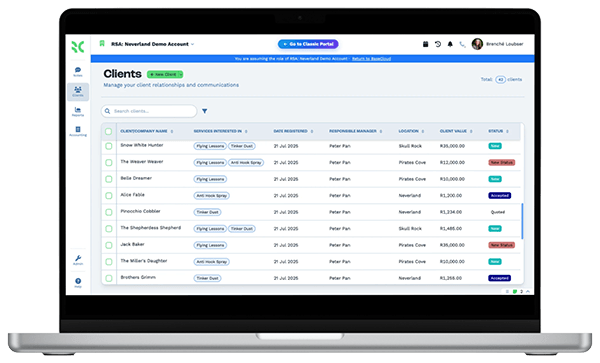
  • Equipment, model numbers and install dates on every customer
  • Review requests after every completed job

How it works

From the first call to the next tune-up

Four jobs an HVAC office handles every day, set up once in BaseCloud.

Every call answered or returned

A call menu separates emergencies, new estimates and existing customers. After hours, calls follow the on-call tech to their cellphone.

  • Ring groups for the office, follow-me for the on-call tech
  • Missed calls get an instant text and a callback task
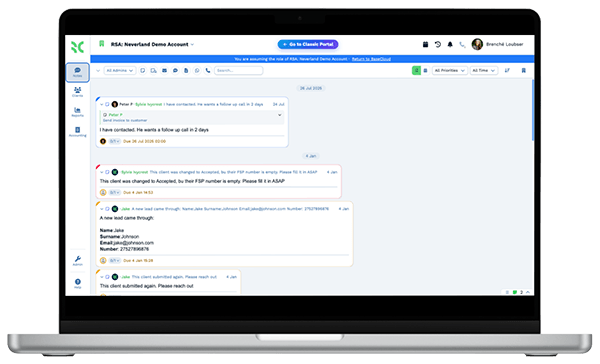
  • Every call recorded and summarized on the customer

What you get

Built for the HVAC office

The BaseCloud features an HVAC company uses every day, in shop terms.

  • After-hours call routing

    An IVR menu, ring groups and follow-me to the on-call tech's cellphone, so no-heat calls get answered.

  • Pricebook estimates and invoices

    Good, better, best options from a pricebook with bundles, presented on a tablet and turned into an invoice.

  • Equipment on every customer

    An Equipment table per customer with brand, model, serial number, install date and warranty end date.

  • Tune-up and follow-up workflows

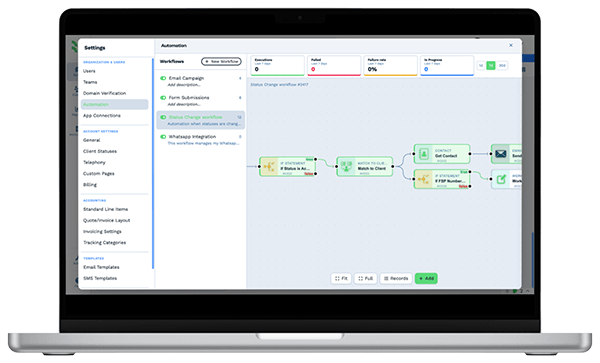
    Seasonal tune-up campaigns, estimate follow-ups and agreement renewals triggered by dates on the customer.

  • Google reviews and rank grid

    Ask for reviews after each job, reply to new ones and see your Maps ranking across your service area.

  • Call tracking per ad

    Tracking numbers on Google Ads, mailers and truck wraps show which marketing makes the phone ring.

The BaseCloud difference

Built in, not bolted on

Calling, texting, WhatsApp, email, quoting, e-signature and automation are part of BaseCloud, not add-ons from other vendors. One login, one client record, and no connectors to keep alive between separate subscriptions.

  • Phone system
  • SMS
  • WhatsApp
  • Gmail / Microsoft 365
  • Workflow automation
  • Quotes & invoices
  • E-signature

HVAC Companies on BaseCloud

One no-cool call, from voicemail to agreement

This is an example of how an HVAC company can set up BaseCloud. Every step is a standard workflow you can change.

Example workflow

A homeowner whose 15-year-old AC stops on a Saturday afternoon

The homeowner found you on Google Maps and calls on a weekend. Here is how the call becomes a customer for years.

  1. 1. Call answered

    The IVR sends the emergency to the on-call tech's cellphone. The call is recorded on a new customer.

  2. 2. Visit and options

    The tech logs the old unit in the Equipment table and presents three replacement options from the pricebook.

  3. 3. Follow-up

    The homeowner wants to think about it. Texts and a call task follow on day 2 and day 7.

  4. 4. Job won

    The homeowner accepts. The estimate becomes an invoice with an online payment link.

  5. 5. Review asked

    After install, a text asks for a Google review. The new review triggers a reply.

  6. 6. Agreement started

    The homeowner joins the maintenance plan. Monthly billing and tune-up reminders start on their own.

The office spends its time scheduling and selling. Callbacks, follow-ups, tune-ups and billing run on schedule.

We pride ourselves on 5-Star Service

4.98 Google rating

Read our reviews on Google

FAQ

HVAC CRM questions

Does BaseCloud integrate with ServiceTitan or Housecall Pro?
There is no built-in connection to field service software. If your system can export CSV files or send webhooks, customers and jobs can come into BaseCloud. Many contractors use BaseCloud for calls, texting, estimates, follow-up and reviews.
Does it dispatch technicians?
BaseCloud doesn't have a dispatch board or GPS tracking. Jobs can be booked in technicians' Google or Outlook calendars, viewed together on a team calendar, and assigned as tasks.
Can we sell maintenance agreements with monthly billing?
Yes. Agreement customers get a recurring invoice, pay by card through Stripe, and get tune-up reminders on the schedule you set. Invoices can sync to Xero.
Can calls ring the on-call tech after hours?
Yes. Call flows can route after-hours calls to a team member's cellphone, play a menu first, or take a voicemail and text the caller that someone will call back.
Can we text customers from the office number?
Yes. Two-way texts go out from your business numbers and replies land on the customer. For US numbers BaseCloud registers your 10DLC brand and campaign for you.
Can we keep our current phone numbers?
Yes. Existing numbers can be ported into BaseCloud, and you can add tracking numbers for ads and mailers.

Every call answered. Every tune-up booked.

Tell us how your office handles calls, estimates and agreements, and we'll show you that setup in BaseCloud.

See it for yourself

Watch the system in action