















4.98 Google rating

For realtors, teams and brokerages

CRM for Real Estate Agents

BaseCloud is a real estate CRM with the phone system and texting built in. New leads get a call within minutes, showings confirm themselves, and your past clients hear from you on their home anniversary without anyone setting a reminder.

Weighing us up against what you run now? Grab the CRM comparison sheet.

Real estate agent tracking buyers, sellers and listings in BaseCloud CRM

Every lead called back in minutes

Example workflowFrom new lead to closing day

Clients who love our CRM system

Feel free to ask them about us.

  • Galetti logo
  • Quatro logo
  • Agriskills logo
  • Mastercare logo
  • Aluma logo
  • TutorsSA logo
  • Gawie le Roux Institute of Law logo
  • BNI logo
  • Vision Works logo
  • Intello Group logo
  • Kern Insurance Brokers logo
  • KPC Brokers logo
  • Tiger Risk logo
  • Helfin Financial Services Group logo
  • EagleSure logo

The first agent to call back usually gets the showing. The agent who stays in touch gets the referral.

Leads arrive from your website, Zillow and Realtor.com emails, sign calls, open houses and Facebook ads. They land in different inboxes, the callback waits until after the next showing, and the buyer has already toured with someone else. Past clients drift for the same reason. Nobody has time to remember them.

What BaseCloud CRM solves

What a real estate CRM should fix

  • Every lead, from any source, logged on one contact with its source recorded
  • A call back within minutes, not after the next showing
  • Showing and open-house reminders by text, sent without anyone typing them
  • Buyer criteria and saved properties on the contact, not in an agent's head
  • Listing and buyer agreements signed online, with an audit trail
  • Past clients and your sphere contacted on a schedule, for years

How it works

From first inquiry to closing day

Four jobs every agent does every week, and how BaseCloud runs each one.

Speed to lead, handled

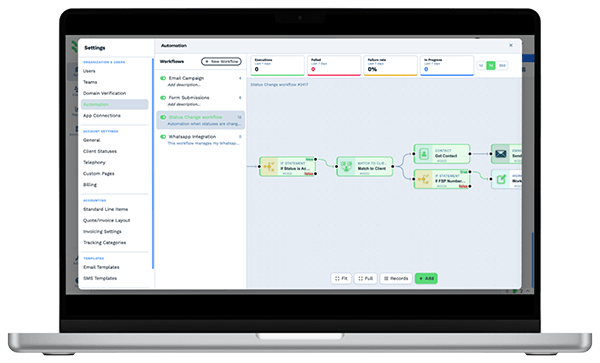
A form fill, a Facebook lead ad or a portal email creates the contact, records the source and starts the follow-up.

  • Call Connect rings the agent the moment a web lead arrives and dials the buyer
  • Portal lead emails can be turned into contacts with an Inbound Email workflow
  • Round-robin assignment spreads leads fairly across the team
Automation workflow builder in BaseCloud CRM with run counts and connected steps

AI receptionist

An AI receptionist that books showings after hours

Buyers call when they drive past your sign, and sellers call in the evening to ask what their home is worth. The AI receptionist answers and books the showing or home valuation on the right agent's calendar while the caller is on the line. The caller gets a text with the booking.

  • Answers after hours, or whenever nobody in the ring group picks up
  • Greets past clients by first name and remembers their past calls, emails and texts
  • Confirms who is calling before it shares anything about a listing or a sale
  • Takes messages as call-back notes in the agent's Inbox
  • Puts callers through to the listing agent, checking first that they are free

What you get

Built for how agents actually work

The parts of BaseCloud a real estate team uses every day, in real estate terms.

  • Call new leads back in seconds

    Call Connect phones the agent as a web lead arrives, then connects them to the buyer. No lead waits until after lunch.

  • Every call recorded and summarized

    Calls with buyers, sellers and lenders are recorded, transcribed and summarized with action points on the contact.

  • Texting with 10DLC done for you

    Two-way and bulk text from your business number. BaseCloud handles the US 10DLC brand and campaign registration.

  • Properties and buyer criteria

    Add a Properties table to each client and fields for price range, beds, areas and pre-approval. Filter buyers when a listing goes live.

  • Agreements signed online

    Send listing agreements and buyer agreements for e-signature with OTP checks and a completion certificate.

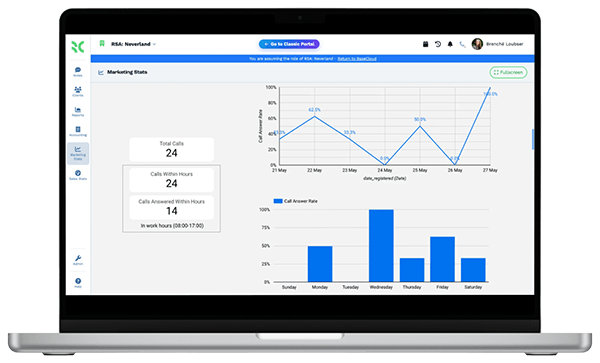
  • Know which ad made the phone ring

    Give each listing ad, sign or campaign its own tracking number and see which ones produce calls.

Ready from your first sign-in

Set up for your industry in one click

The first time you sign in, you pick your industry and BaseCloud sets up your account in its words: your pipeline, client fields, Clients list columns, a table for what you track on each client, email and text templates signed with your business name, and an industry dashboard first in Reports.

Your Real Estate setup

Your pipeline

  1. New Lead
  2. Active Buyer
  3. Active Seller
  4. Under Contract
  5. Closed
  6. Past Client
  • Table: Properties (Address, Price, Status, Closing Date)
  • Industries that bill their clients get a price book filled with typical services and prices, switched on
  • Six or seven realistic sample clients, at least one in every status, so the dashboard shows real numbers from minute one
  • One click on Remove sample data clears the samples and keeps the setup, and your first real invoice is numbered 1
  • Rename or change anything in Settings, or ask Claude or ChatGPT connected to BaseCloud to reshape it

The BaseCloud difference

Built in, not bolted on

Calling, texting, WhatsApp, email, quoting, accounting, e-signature and automation are part of BaseCloud, not add-ons from other vendors. One login, one client record, and no connectors to keep alive between separate subscriptions.

  • Phone system
  • SMS
  • WhatsApp
  • Gmail / Microsoft 365
  • Workflow automation
  • Quotes & invoices
  • Accounting
  • E-signature

Real Estate on BaseCloud

One buyer, from lead to closing

This is an example of how a brokerage can set up BaseCloud for buyer leads. Every step is a standard workflow you can change.

Example workflow

A buyer lead from a Facebook ad, handled by a three-agent team

A buyer fills in a Facebook lead form at 7:40 pm. Here is what happens next without anyone touching a spreadsheet.

  1. 1. Lead captured

    The lead ad creates the contact, records the campaign and assigns the next agent in the round robin.

  2. 2. Called in seconds

    Call Connect rings the agent's phone and connects the call. The call is recorded and summarized on the contact.

  3. 3. Criteria on file

    The agent fills in price range, areas and pre-approval status. A text with the agent's details goes out.

  4. 4. Showings booked

    Showings go into the agent's calendar. The buyer gets a text reminder before each one and a feedback request after.

  5. 5. Under contract

    The buyer agreement is signed online. Inspection and closing dates trigger reminders to the agent.

  6. 6. After closing

    A review request goes out a few days later. A home-anniversary message goes out every year after.

The agent spends their time on calls and showings. The follow-up, reminders and paperwork run on their own.

In their words

Client stories

We pride ourselves on 5-Star Service

4.98 Google rating

Read our reviews on Google

FAQ

Real estate CRM questions

What should a CRM for real estate agents do?
It should capture leads from every source, get a fast first call, keep buyer criteria and property details on the contact, remind you about showings and deadlines, and keep past clients in touch for years. BaseCloud does all of that and includes the phone system, texting and e-signature, so you don't need separate tools for them.
Can BaseCloud take leads from Zillow, Realtor.com or my IDX website?
Website forms, Facebook and Instagram lead ads, and any tool that can send a webhook create contacts directly. Portal lead notifications that arrive by email can be turned into contacts with an Inbound Email workflow. Zillow, MLS and other portals connect through automation workflows, webhooks and the API.
Does it work for a solo agent and for a brokerage?
Yes. A solo agent can use it on their own. A brokerage can add teams, roles and permissions down to individual fields, assign leads by round robin, and see each agent's calls, texts and follow-ups in reports.
Can I text leads and clients from the CRM?
Yes. You can send one-to-one and bulk texts from your business numbers, and replies land on the contact. For US numbers, BaseCloud registers your brand and campaign for 10DLC and links your numbers when the registration is approved.
Can I send listing agreements and buyer agreements for signature?
Yes. BaseCloud's e-signature supports several signers in order, a one-time code by text or email, and a completion certificate with an audit trail. Signed documents are saved on the client.
Can I keep my existing business phone number?
Yes. You can port your existing numbers into BaseCloud or buy new local numbers. Calls then ring in the browser, on the BaseCloud Phone app or on a SIP phone.

Fewer missed leads. More closings.

Tell us how your team works today, and we'll show you lead capture, showings and past-client follow-up set up in BaseCloud.

See it for yourself

Watch the system in action