Contractor money moves differently from shop money. A roofer takes a deposit before ordering materials and collects the rest in stages as the job goes up. An HVAC technician takes a card payment at the customer’s door, and the money lands in the bank days later as one payout, less the processor’s fees.
Accounting software for contractors has to follow that money from the job to the bank. This guide covers what to look for, then how BaseCloud Books does it from the same system your office uses to dispatch the work.
What contractors need from accounting software
Generic small business accounting handles sales and expenses. Contractors need a few jobs done well on top of that, every week.
Deposits and part payments
A $12,000 roof replacement rarely gets paid in one go. Your software should record a deposit against the quote, then each progress payment against the same invoice, and always show what is still owed.
In BaseCloud, a payment on a quote turns it into an invoice, so the part payment becomes the deposit. Each later payment carries its amount, date, method and reference, whether it came by EFT, card, card machine, cash or cheque.
Invoices raised from the field
The fastest invoice is the one the technician raises before leaving the driveway. In BaseCloud, a technician finishes the job from My day on their phone. From the same screen they create the invoice and take payment at the door.
That payment is recorded on the invoice and posts to your books at once. The office sees the job done and paid on the Dispatch board, and the bookkeeper sees it in the ledger.
Bank reconciliation that understands payouts
Card processors pay you in batches. A $1,000.00 batch of Stripe payments with $29.30 in fees reaches your bank as $970.70, and matching that by hand eats an afternoon.
BaseCloud Books matches the payout to the payments inside it and books the fee automatically. A customer’s bank transfer matches straight to the invoice it pays, so the payment is recorded and reconciled in one click. Bank rules fill in the everyday lines, such as the fuel card or the monthly bank fee.
Sales tax or VAT
US contractors charge sales tax that often combines state and local rates. BaseCloud Books splits a combined rate over each part, and the Sales tax report card shows what you charged on sales and paid on purchases for the period.
South African contractors get a ready-made chart with 15% VAT. VAT on a bank fee or a purchase is claimed back through the same rate on a bank rule or a spend money line.
Statements for slow payers
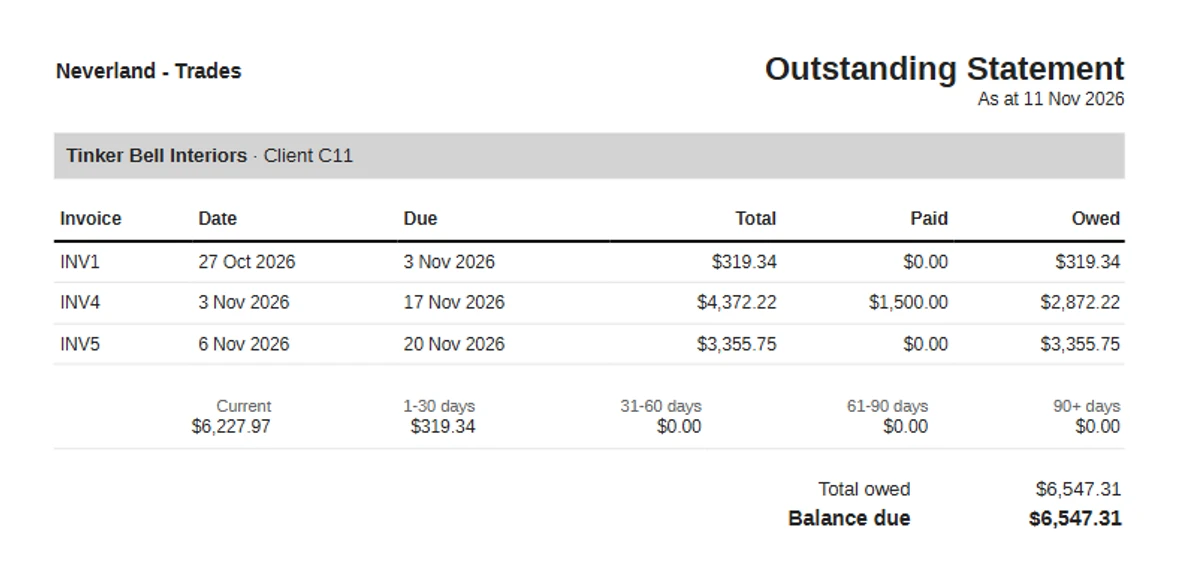
Some customers pay on the first reminder and some need to see the whole account. A statement from BaseCloud goes out as a PDF or by email in one click, from the balance box on the client’s Accounting tab.
The outstanding statement ages every open invoice into current, 1-30, 31-60, 61-90 and 90+ days, then takes off any credit the customer holds. The activity statement lists every invoice, credit note, payment and refund between two dates with a running balance, which settles most “what do I owe you?” calls.
How BaseCloud Books fits a contractor’s day
Here is a Tuesday for a four-technician plumbing company in Phoenix running everything in BaseCloud.
The office books a drain repair on the Dispatch board and sends the nearest technician. He arrives, finishes the job from My day, raises the invoice with the parts and labor lines, and takes a card payment at the door. The payment posts to the books on the spot.
On Friday, Stripe pays out the week’s card payments as one deposit. The office manager opens reconciliation, sees the suggested match with the fees worked out, and clicks OK. At month end the bookkeeper checks the trial balance and sets the lock date, all in the same system as the jobs.
A month-end routine for contractors
- Make sure every invoice for the month is raised and every payment is recorded.
- Reconcile each bank account to the last day of the month.
- Check the trial balance as at the last day of the month with your bookkeeper.
- Set the lock date to the last day of the month, so the closed month stays exactly as reported.
Payments that arrive online or from an automation after the lock date are still recorded, and post on the day after it. Your closed month stays closed and every invoice still shows paid.
Getting started with BaseCloud Books
Copy your chart of accounts and tax rates from Xero, QuickBooks or Sage in one step, enter your opening balances, and BaseCloud works out what every customer owes from your invoices. Our team sets up your books with you and your bookkeeper, usually from the first day of a month or of your financial year.
QuickBooks Online, Xero and Sage also connect directly through automation workflows, for a contractor whose accountant works in one of them. Read how to set up BaseCloud Books for the four setup steps.
Book a demo and we will walk you through BaseCloud Books with a job from your own trade.