
A statement shows a client where their account stands: what you invoiced, what they paid, what you credited and what they still owe. Send one at month end, or whenever a client asks what is outstanding. BaseCloud makes it for one client at a time, as a PDF or by email in one click.
Who can do this: anyone with View Invoices and access to the client.
Make a statement
- Open the client and go to their Accounting tab.
- In the balance box at the top, click Statement.
- Choose Activity or Outstanding, then the days. The statement shows straight away and updates as you change the days.
- Click PDF to open it as a PDF, or Send and choose Email, Text or WhatsApp.
Send makes the PDF and opens the writing panel on the client. An email has the PDF attached and the subject filled in, such as “Statement 1 Nov 2026 to 8 Nov 2026”. A WhatsApp message carries the PDF, and a text carries a link to it.
Activity statement
The activity statement lists everything that happened on the client’s account between two days, in date order:
- The balance brought forward at the start of the first day
- Every invoice, credit note, payment and refund in between, each with its date, number, description, reference and amount
- The running balance after each line
- Totals for what was invoiced, credited, paid and refunded
- The balance at the end of the last day
Both days are included, and it runs from the first of this month to today until you pick other days. The PDF is headed Statement of Account.
Outstanding statement
The outstanding statement shows what is open on one day, today unless you pick another. Each invoice the client still owes on is listed with its number, date, due date, total, what has been paid, the balance and how many days overdue it is.
The balances are then aged by how overdue they are:
| Bucket | The invoice is… |
|---|---|
| Current | within its due date |
| 1-30 days | 1 to 30 days past its due date |
| 31-60 days | 31 to 60 days past it |
| 61-90 days | 61 to 90 days past it |
| 90+ days | more than 90 days past it |
The client’s unused credit is listed too, and the Balance due is what they owe less that credit. Each invoice is aged on its due date, and an invoice with the due date left blank counts as due 7 days after its date. The PDF is headed Outstanding Statement.
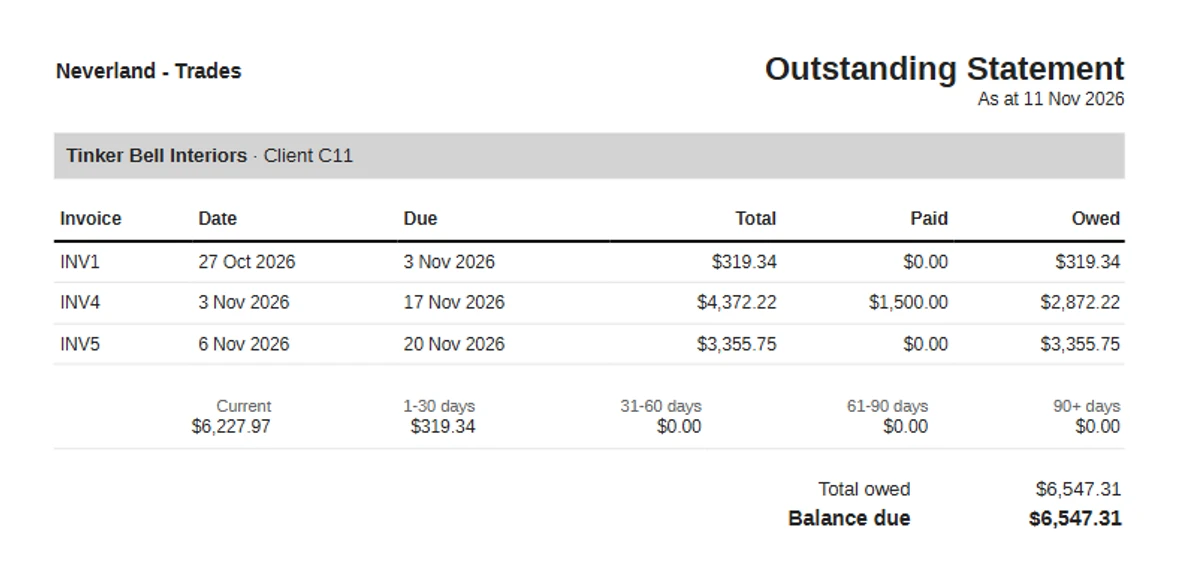
Reading the balance
A positive balance is what the client owes you. A negative balance is credit they hold, because they paid more than they owed or have a credit note to use.
The statement PDF uses the logo and header color from your default quote and invoice layout, in your account’s currency. Days follow your account’s timezone, set in Settings, then General.
Ask your AI to send it
With BaseCloud connected to an AI app such as Claude or ChatGPT, ask for a client’s statement in plain words. The AI reads the statement and sends it to the client by email, WhatsApp or text. See the Claude and ChatGPT connector.
Statements across all your clients
The Unpaid invoices by age and Outstanding balance report cards on the Reports page show what every client owes in one view. With BaseCloud Books on, the Aged receivables card shows each customer’s balance by age on any date, and a click on a customer opens them.
To record the payments that come in after a statement, see payments, part payments and credit notes.