
Most of your books post by themselves from your invoices and payments. This guide covers the tools your bookkeeper and accountant use around them: manual journals, the two lock dates, your financial year end and the trial balance.
Who can do this: Post Journals to post and reverse manual journals. Lock Periods to change the lock dates and the financial year end. Adviser to post journals between the two lock dates. View Books to see these settings, the journals and the report cards.
Post a manual journal
A manual journal is for entries typed in by hand: your accountant’s depreciation, accruals and prepayments, owner’s draws, or clearing Historical Adjustment after you start your books.
- Open Accounting, then General ledger, and click New manual journal.
- Enter the date and the narration, such as “Depreciation for March 2027”.
- Pick how amounts are entered for tax: No tax, Tax exclusive or Tax inclusive.
- Add the lines. Each line has an account, a description and an amount under Debit or Credit, and can take a tax rate and a contact.
- Check the debits and credits are equal, tax included, and post it.
With Tax exclusive, a $100.00 expense at 15% posts $100.00 to the expense and $15.00 to the tax account. With Tax inclusive, $115.00 at 15% posts the same two amounts. The journal gets the next journal number and is in your books straight away.
A journal balances to the cent and has at least two lines. Customer balances move through invoices, credit notes and payments, so a journal uses your other accounts and each customer’s balance always adds up to Accounts Receivable.
Reverse a journal in one click
Open the journal from General ledger and click Reverse. BaseCloud posts a new journal with every line the other way round, on the same date, so the two cancel out. The original stays in your books marked Reversed, and the new one is marked Reversal.
Then post a new journal with the right figures. Every correction stays visible, which gives your accountant a complete audit trail.
The two lock dates
Once a month or a year is finished, and especially once you have filed a tax return for it, a lock date closes everything on or before it. Set both in Settings, then Books, and click Save settings.
| Setting | What it does |
|---|---|
| Lock date for everyone | Everyone, your adviser included, is held to it. Usually the end of a year you have filed |
| Lock date for everyone but advisers | Your team is held to it, and anyone with the Adviser right keeps posting manual journals after the lock date for everyone. Usually the end of the last month or quarter you closed |
On or before the lock date, invoices, payments, credit notes, bank lines and journals stay exactly as they were reported. BaseCloud explains why when it holds something back, and a correction goes in as a manual journal dated after the lock date.
Payments that arrive by themselves are always recorded. A customer who pays online, or an automation that marks an invoice paid, still marks the invoice paid, and its entry posts on the day after the lock date so your closed period stays as it was.
Financial year end
Set Financial year ends (the month and the day) in Settings, then Books. It starts at December 31, which suits most US businesses, and many South African businesses end theirs on the last day of February.
Your year end decides where each year starts in your reports. Income and expenses show from the day after it, and earlier years’ profit goes into Retained Earnings automatically when the year closes.
Every change to these settings is kept under History in Settings, Books, with who made it and when, next to the value it replaced.
Trial balance
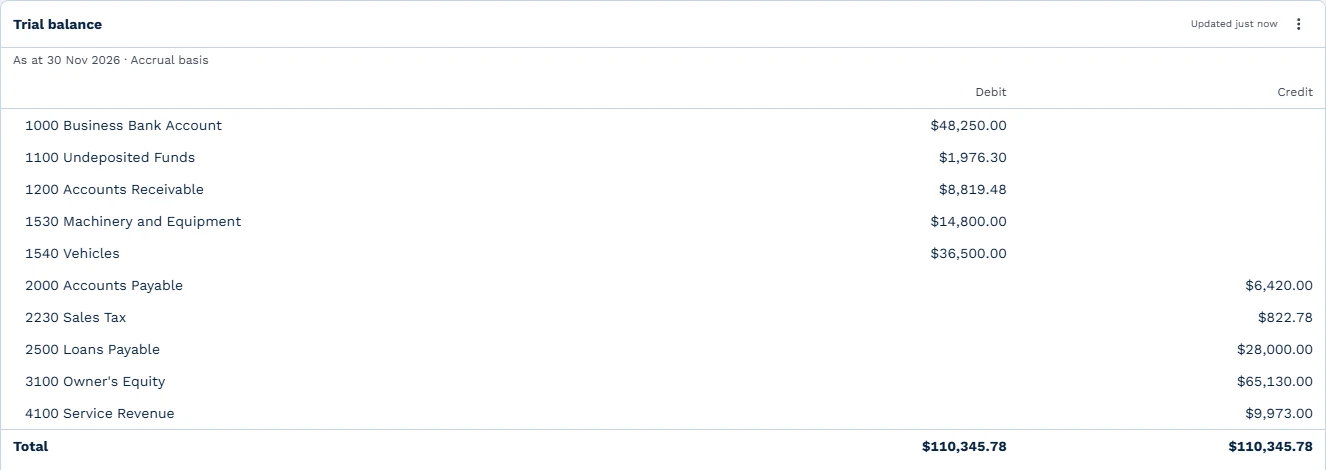
The trial balance is a report card on the Reports page. Add a card, open the Books group and pick Trial balance, then set the date range on the dashboard.
It shows every account’s balance on the last day of the range, as a debit or a credit, and total debits always equal total credits. Balance-sheet accounts show everything since your books began. Income and expense accounts show the current financial year, and earlier years’ profit sits in Retained Earnings.
For example, with a December 31 year end, a trial balance as at March 31, 2027 shows Service Revenue for January 1 to March 31, 2027. Everything earned in 2026 is in Retained Earnings. The same Books group holds profit and loss, the balance sheet, aged receivables, sales tax and the general ledger, and every card downloads as a CSV file.
Account transactions and journals
Click any account on a books card or in the chart of accounts to see what posted to it between two dates. You get the opening balance, each line with its date, journal number, source and customer, a running balance after each line, and the closing balance.
Accounting, then General ledger, lists every journal newest first, filtered by date and source. Open one to see its lines and who posted it. A link leads back to the invoice, credit note, payment or bank transaction it came from.
Your books keep every entry: each change posts a reversal and a new entry, so the journals are their own audit trail.
A month-end routine
- Make sure every invoice for the month is raised and every payment is recorded.
- Reconcile each bank account to the last day of the month. See bank reconciliation and bank rules.
- Check the trial balance card as at the last day of the month with your bookkeeper.
- Set the lock date to the last day of the month.
Read more about BaseCloud Books.