A physio is halfway through a session when the clinic line rings for the third time in ten minutes. A virtual receptionist picks up those calls and books the patients in, so the person with the patient stays with the patient.
There are two ways to get one. You can hire a human service, or you can add an AI receptionist to your own phone system. Here is how each works, and how BaseCloud’s AI receptionist handles your calls.
What a virtual receptionist does
A virtual receptionist answers your business number from somewhere other than your front desk. The job is the same as a receptionist’s: greet the caller, answer the routine questions, book the appointment, take a message and put urgent calls through.
What sets the options apart is who does the answering, and how much of your business they work from while they do it. A plumber needs a job booked on the right day. A dental practice needs the right hygienist’s diary.
Human virtual receptionist services
A human service gives you a team of receptionists, usually in a call center, who answer with your business name. They work from a script you agree on and pass messages to you by email or text.
Pricing usually runs per minute or per call, often in monthly bundles. A human service suits a business that wants a trained person on the line for every call.
An AI receptionist inside your phone system
An AI receptionist is a virtual receptionist that lives in your phone system. It answers day and night, up to 10 calls at the same time, and works straight from your client records and calendars.
Because it sits in the same call flow as your ring groups and voicemail, every call it handles lands on the client record next to your team’s own calls. The next person who speaks to that customer sees what was said.
How BaseCloud’s AI receptionist answers your calls
You choose where it answers. Put it first on every call, or after a ring group so your team gets the first chance to pick up. The After hours template covers evenings and weekends.
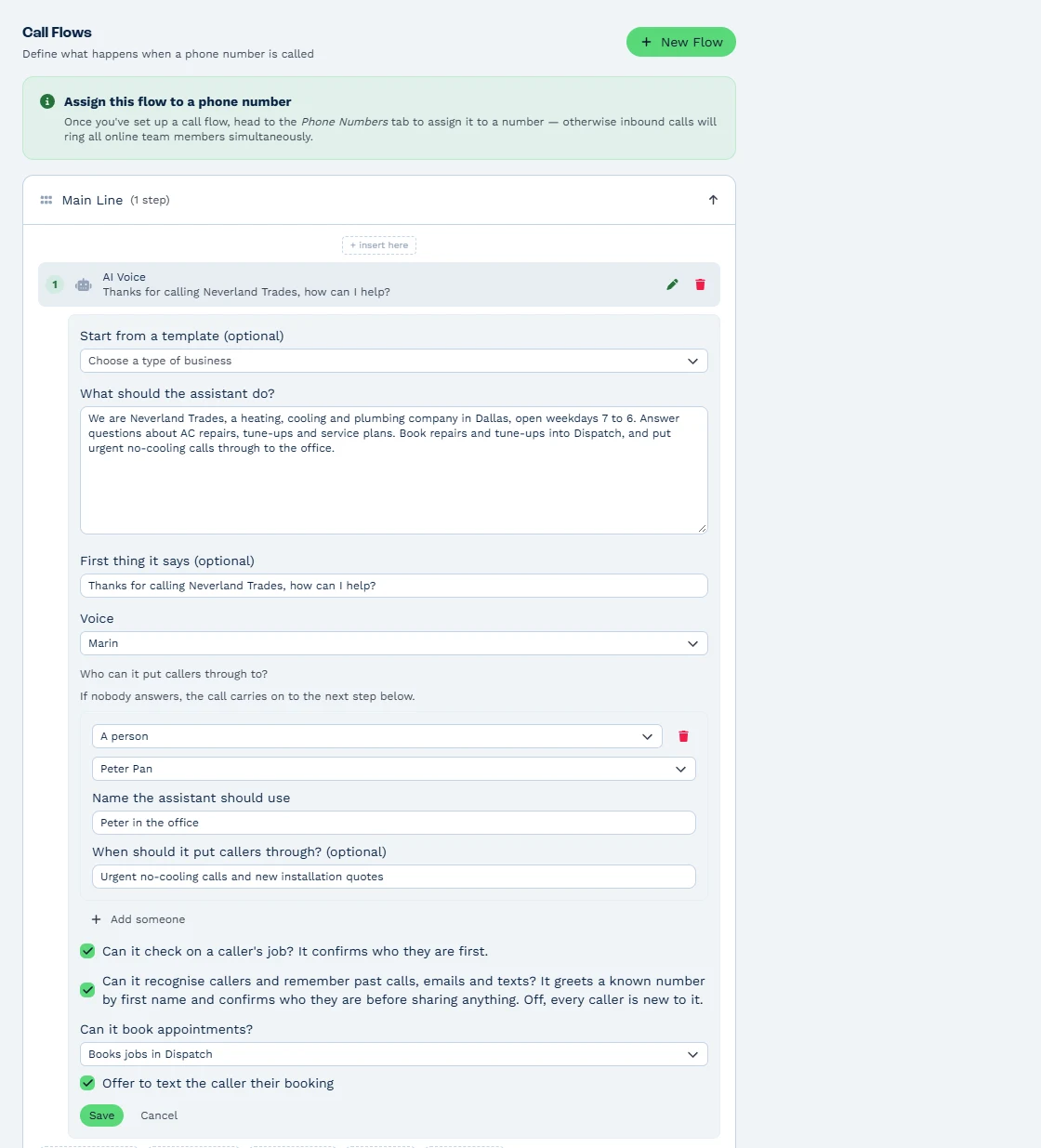
It answers from the business facts you write in, up to 8,000 characters: your hours, service areas, services and what it should never promise. Start from one of five templates (Front desk, Heating and cooling, Home services, Appointments or After hours), then choose from 10 voices and write your own opening line.
It greets known callers by first name and remembers what they said in past calls and messages. Before it shares anything, it confirms who is calling, as a good receptionist would, and keeps staff notes and anything marked sensitive private.
Booking real appointments and Dispatch jobs
While the caller is on the line, the assistant books real appointments on the calendars of the people you choose, or books jobs straight into Dispatch. It offers the open times closest to what the caller asked for, with whoever is free or the person they asked for.
Online meetings work too, with the link sent to the caller’s email through a connected Microsoft or Google calendar. The assistant texts the caller their booking, and the person booked gets an Inbox note each time.
New callers become clients automatically. For a caller it has confirmed, the assistant moves or cancels a booking on request.
Messages, put-throughs and Take over
A caller who wants a person gets put through to one of up to 10 named people or call flows, after the assistant checks whether that person is away or busy. Messages land as call-back notes in the right person’s Inbox, and Call History shows each call as ‘Answered by: AI assistant’.
Anyone with an extension and the Manage Phone & Messaging right clicks Take over on a live AI call in the Calls column, and the caller moves to them. Whenever a caller needs more, the call carries on to the next step in your flow, such as a ring group or voicemail.
Automations pick up from there. The Call Logged trigger tells a workflow how an AI call ended and passes along the AI’s summary, so you can text a manager or tag the client.
What BaseCloud’s AI receptionist costs
The AI receptionist is included on every plan and paid by usage from prepaid credit after each call. It costs R0.60$0.085 per 1,000 tokens, about R1.98$0.28 a minute at typical talk, on top of the normal call rate.
Each call shows as its own AI Voice line in your billing, with the minutes and tokens it used. Our pricing guide works through a full month as an example.
Set it up in Settings > Telephony/Texting
In Settings > Telephony/Texting > Call Routing, open a call flow and add an AI Voice step. Pick a template and edit the instructions so they sound like your business, then make a test call.
Prefer to type a sentence? Ask Claude or ChatGPT, connected to BaseCloud, to “Set up an AI receptionist for our main number”. The receptionist page shows everything the AI Voice step does, and you can book a demo to hear it answer a call on a live account.