A homeowner’s water heater bursts at 9:40 at night. They call plumbers down the list, and the first company to answer gets the job.
An after hours answering service picks up those calls once your office closes. In BaseCloud, an AI receptionist books the job onto your Dispatch board and puts real emergencies through to whoever is on call tonight, all inside your own phone system.
The after hours call problem for contractors and practices
Contractors get their most urgent calls when the office is closed: no heat on a winter night, or a roof leaking through a Saturday storm. Those callers want a booking before they hang up.
Practices get a different kind of after hours call. A patient wants to move tomorrow’s 8am appointment, or a new patient wants to book once they finish work.
Voicemail holds these calls until morning, and plenty of callers ring the next business instead. An answering service turns them into booked work by the time your team arrives.
Start with BaseCloud’s After hours template
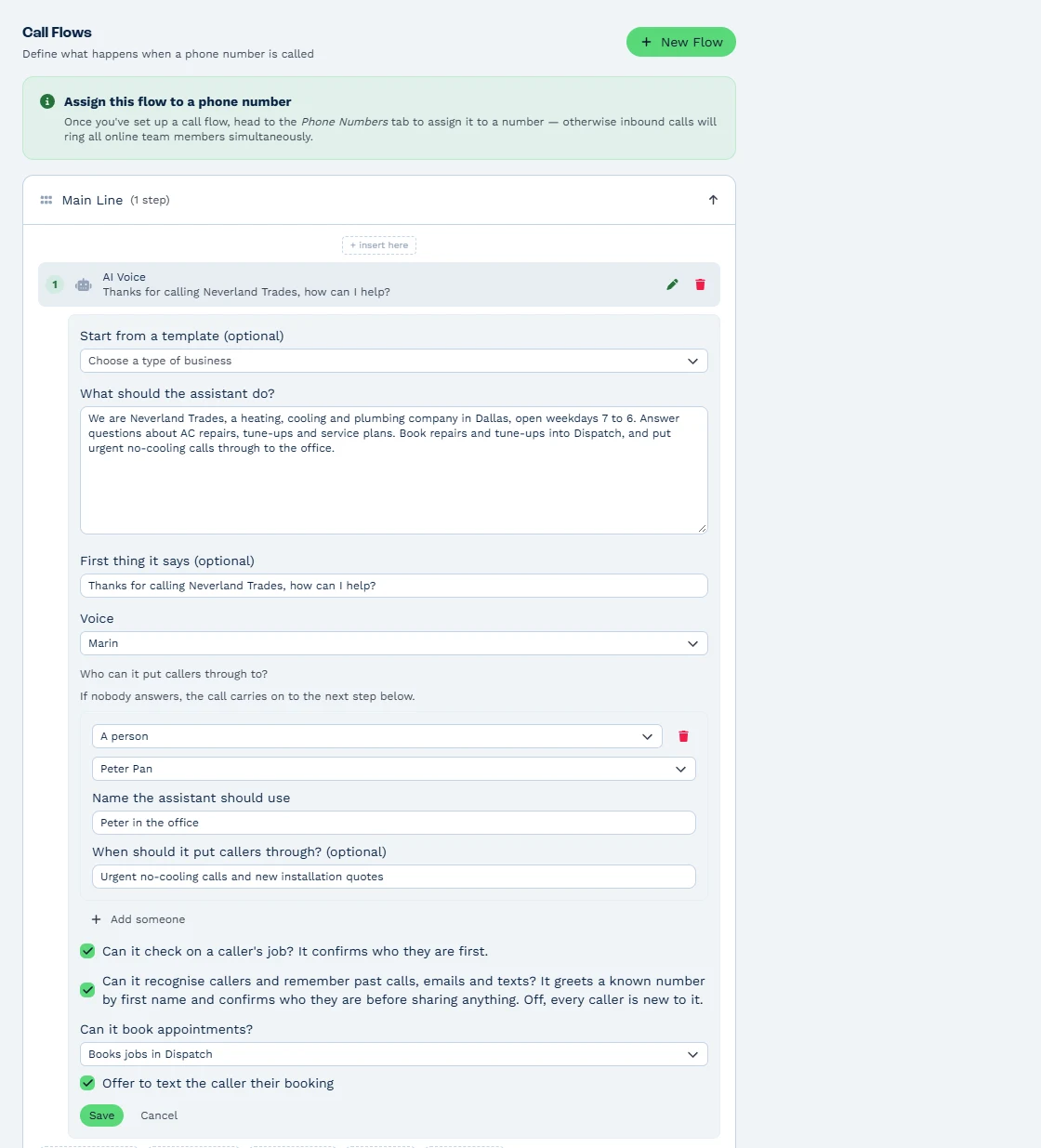
BaseCloud’s AI receptionist comes with five templates, and After hours is built for this job. Add an AI Voice step to the call flow for your number and place it to answer after hours, or whenever nobody in a ring group picks up.
Write your business facts into the instructions, up to 8,000 characters. Include your service areas and what counts as an emergency, so the assistant knows a dripping faucet can wait for a morning slot and a burst pipe goes to your on-call plumber.
The assistant greets known callers by first name and confirms who is calling before it shares anything. Your customers hear one of 10 voices, with an opening line you write.
Booking jobs into Dispatch overnight
Turn on ‘Can it book appointments?’ in the AI Voice step and choose ‘Books jobs in Dispatch’. The assistant offers the caller real open windows from your Dispatch schedule and books the job while they are on the line.
It can text the caller their booking too. New callers become clients automatically, and the job is waiting on the board when your dispatcher opens Dispatch in the morning.
Existing customers get answers at any hour. The assistant tells a caller where their Dispatch job stands and when the technician arrives. It names the technician too, by first name.
Call-back notes in the right Inbox
Some callers just want a call back. The assistant takes the message as a call-back note in the right person’s Inbox, and every call is logged on the client with its note.
Call History shows each one as ‘Answered by: AI assistant’. Your office manager starts the morning with a clear list of who rang overnight and what each caller needs.
On-call routing for emergencies
Emergencies go straight to a person. The assistant puts callers through to up to 10 named people or call flows, checking first whether that person is away or busy.
Set your on-call technician, or an on-call ring group in its own call flow, as a put-through destination. Whenever a caller needs more, the call carries on to the next step in your flow, such as that on-call ring group or voicemail.
Text the on-call manager with a Call Logged automation
BaseCloud’s Call Logged trigger tells a workflow how an AI call ended and passes along the AI’s summary. The outcomes are resolved, message taken, booked, handed off, not a customer and spam.
Build a workflow that texts the on-call manager the AI’s summary each time an after-hours call is booked or handed off. The manager reads what happened in one text and decides on a call-back tonight.
What after hours cover costs in BaseCloud
The AI receptionist is included on every plan. Each call is paid by usage from prepaid credit at about R1.98$0.28 a minute at typical talk, on top of the normal call rate, so a quiet night costs nothing.
See everything the AI Voice step does on our receptionist page, or book a demo and we will set up an After hours call flow with you on a live account.