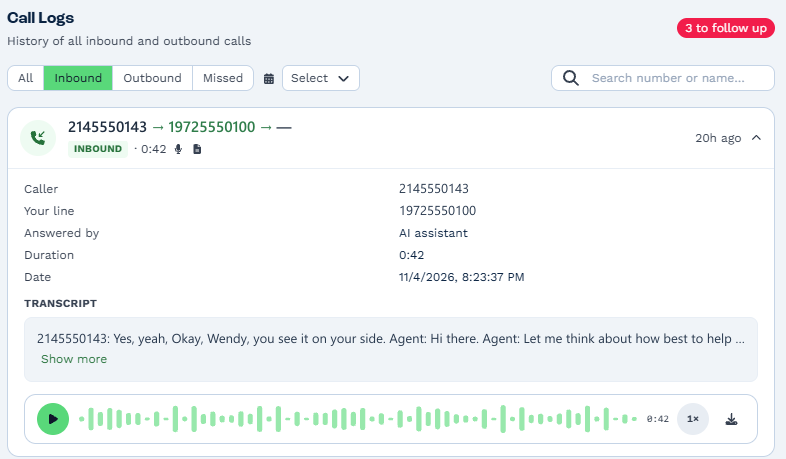
A patient rings your front desk to move a root canal, and that one call now holds health information: their name, their number, the procedure and the recording. A HIPAA compliant phone system protects all of it, from the moment the phone rings to the transcript saved afterward.
BaseCloud is HIPAA compliant, and we sign a Business Associate Agreement (BAA) with your practice. Here is what HIPAA asks of a practice phone system, and how BaseCloud covers each part.
What HIPAA asks of a practice phone system
HIPAA’s Security Rule asks every practice to protect electronic patient information with technical safeguards: access control, audit controls, integrity, authentication and transmission security. Those safeguards apply to your phones as much as to your patient files.
Calls create more patient information than most practices expect. A voicemail about test results, a recorded billing call, its transcript and a missed-call alert on a receptionist’s lock screen all count.
Any vendor that stores or handles that information for you is a business associate under HIPAA, and you need a signed BAA with them. That makes the BAA the first thing to ask a phone provider for.
BaseCloud is HIPAA compliant, and we sign a BAA
BaseCloud runs your phone system and your patient records in one CRM, so one agreement covers both. Ask our team for a BAA and we switch your account to a BAA account, with the change recorded in your activity log.
Your front desk keeps answering calls the way it always has, and the protections below run automatically. The same safeguards cover the rest of the CRM, from email to invoices, as our HIPAA page explains.
Every call recorded and transcribed on the patient record
Every call through BaseCloud is recorded and transcribed on the patient’s record, with an AI summary next to it. When the patient rings back next week, whoever answers sees the last conversation before saying hello.
Permissions decide who opens those recordings. Set a team to ‘Only view clients the user is responsible for’, and its members see their own patients’ notes, emails, texts, files and call recordings everywhere: lists, search, the Inbox, reports and exports.
A separate Manage Phone & Messaging right controls who changes your phone and messaging setup. It all runs on the phone system built into BaseCloud, so your recordings sit in the same protected place as the rest of your patient data.
Private notifications on every lock screen
In a BAA account, every notification simply says what happened: ‘Incoming call’, ‘Missed call’, ‘New message’ or ‘Upcoming meeting’. A phone lying face up on the reception desk shows the alert, and the patient’s name and details open inside BaseCloud when your team taps it.
Mark as done works straight from the notification, and the BaseCloud Phone app shows the caller once the call reaches the phone. Call history shows who called, as always.
Every user in a BAA account sees a HIPAA notice under Settings > their user > Notifications that explains how their alerts work. These private notifications cover your computers and phones alike, the BaseCloud Phone app included.
Six-year audit logs and Microsoft Defender
BaseCloud keeps audit logs of file access, database activity, sign-ins, key vault reads and admin changes for six years. They sit in a tamper-proof, write-once archive closed to the public internet, and every database statement a person runs is logged.
Microsoft Defender protects the servers, the file store, the key vault and the database, and every uploaded file is scanned for malware. Both phone switches, in the US and South Africa, get geo-redundant backups every day.
Staff reach the phone switches over a private network, with every sign-in recorded by name. Call and text events are accepted when signed by the carrier, so every call record in BaseCloud is genuine. The full list of safeguards is on our security page.
Encrypted desk phones, the Phone app and the browser
Plenty of practices keep a desk phone at reception and one in each treatment room. BaseCloud connects Yealink and other SIP desk phones over encrypted TLS on port 5061, with step-by-step setup written in the phone’s own menu labels and a copy box for each value.
Your team also answers on the BaseCloud Phone app and in the browser, on the same extensions and ring groups. A hygienist between patients picks up a transferred call on her phone, and the recording still lands on the patient’s record.
An AI receptionist that confirms who is calling
BaseCloud’s AI receptionist answers inside the same HIPAA compliant phone system. Before it shares anything, it confirms who is calling with the caller’s full name and another true detail from their record, as a good receptionist would.
It books appointments on your providers’ calendars and takes messages as call-back notes in the right person’s Inbox. Staff notes and anything marked sensitive stay private.
AI in BaseCloud workflows runs on OpenAI and Anthropic, the providers covered by a BAA. Your practice gets after-hours cover and a lighter front desk on the same agreement as the rest of your phones.
See a BAA account answer a real call
Your phones handle patient information all day, and BaseCloud protects every call from ring to record. Book a demo and we will show you a BAA account taking a call, from the private lock-screen alert to the transcript on the patient’s record.