A CRM is used to keep every customer conversation and every deal in one place, so no lead gets forgotten and nobody asks a customer the same question twice. Teams use it to capture new leads, follow up on time, move deals forward, send quotes and invoices, and see which marketing brings in customers.
Say a home-service company misses a call at 5:40 pm on a Friday. Without a CRM, that number sits in voicemail until someone remembers it on Monday. With one, the caller already has a record and gets a text within seconds, and a task is waiting for the right person.
This guide covers 10 practical CRM use cases, one scenario for each, with screenshots and sourced data along the way. It then shows how those uses split by team and industry, then by business size. For the definition and how to choose software, read the guide to CRM software.
What is a CRM used for day to day?
Most days a CRM does four jobs. It records what happened with each customer, reminds people what to do next, handles repetitive admin and shows the owner what is working.
A sales rep opens it to see who to call first. An office manager opens it to find a customer’s quote. An owner opens it to check this month’s pipeline. All of them are looking at the same record.

The value grows when customers reach you through several channels. Calls, texts, WhatsApp messages, emails, web forms and ad leads all land in one place, so the person answering sees the whole story instead of one piece of it.
10 CRM use cases, each with a scenario
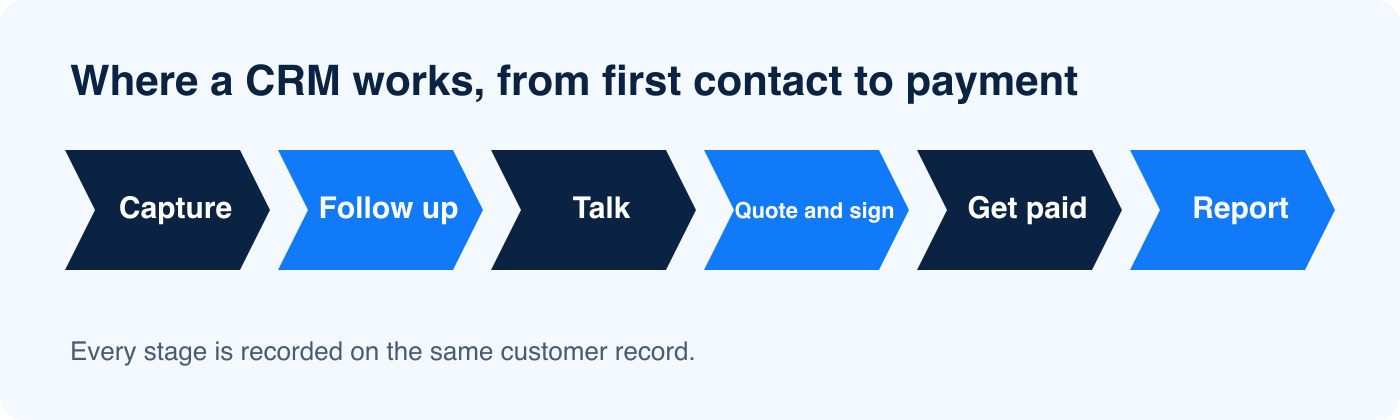
The use cases below run roughly in the order a customer moves: from first contact to payment, then to reporting on the whole process. The screenshots come from a BaseCloud demo account and show sample data.
Capture every new lead
A CRM creates a record for each new inquiry the moment it arrives. A web form submission becomes a contact with its source attached. So does a Facebook or Instagram lead ad, and so does a call to a tracking number.
Picture a solar installer running Facebook lead ads on a Saturday. Every lead appears in the CRM within seconds with the person’s contact details and the ad it came from, instead of waiting in a spreadsheet export on Monday. BaseCloud’s Call Connect goes a step further and rings your rep the moment a web form arrives, then connects them to the lead.

Follow up without dropping anyone
A CRM turns “I should call them back” into a task with an owner and a date. Each lead sits in a pipeline stage, and a lead with no next step stands out.
Speed matters here. A Harvard Business Review audit of 2,241 U.S. companies found that 37% responded to a web lead within an hour, 16% took between one and 24 hours, 24% took longer than a day and 23% never responded. The same article reports that firms that contacted a lead within an hour were nearly seven times as likely to qualify it as firms that waited an hour longer.

An insurance broker sends 30 quotes in a week and hears back from eight. The CRM lists the other 22 with the date of each quote, so the broker works through them by age instead of by memory. The calendar sits inside the CRM too, so a booked consultation lands on the right person’s week.

Run calls, texts, WhatsApp and email from one record
Every message in or out is saved on the customer’s record, whichever channel it used. A customer who emails on Tuesday and calls on Thursday has one thread.
In BaseCloud, the phone system runs in the browser, and texts and WhatsApp share one inbox. New emails are matched to the right client automatically, so a colleague who picks up the account can read what was said without asking the last person.
Keep a record of every call
Calls are where a lot of business gets decided and where the least gets written down. A CRM with a built-in phone records each call against the customer and keeps it with them.
BaseCloud adds a transcript and an AI summary with action points moments after a call ends. A property manager finishes a tenant call and finds the repair request and the promised callback time already on the record, with no typing.
Track deals through a pipeline
A pipeline shows every open deal by stage, with the value and the owner on each. Reps know which deals need attention, and a manager sees where deals stall.
A recruitment agency can see that 14 candidates are waiting on a client’s feedback while only two roles are open for interviews. That points the team at the client who needs a nudge instead of at the candidates.
Quote, sign, invoice and get paid
Quotes, contracts and invoices live on the same record as the conversation that led to them. A rep builds a branded quote from the pricebook and sends it with a payment link. When the customer agrees, it becomes an invoice.
BaseCloud can also send contracts for e-signature, with a one-time passcode check and a completion certificate, so nothing needs a separate subscription. An HVAC company sends a replacement quote from the truck and gets it signed that afternoon. The invoice goes out the same day.

Automate repetitive admin
Workflows do the steps people forget. A new lead arrives, the CRM assigns an owner, sends a text and creates a follow-up task without anyone touching it.
The workflow builder in BaseCloud has 16 triggers and 50 actions to build these from. A law firm can use one to answer each new inquiry within a minute and book the consultation, even when the office is closed.

Each step a workflow takes over is one your team no longer has to remember, which frees the people to spend their week talking to customers.
Show which marketing brings in customers
A CRM can follow a lead from the first click to the closed sale. Forms capture the UTM and Google Analytics details, and calls to tracking numbers are attributed to the campaign that made the phone ring.
When a lead becomes a customer, BaseCloud can send that result back to Meta and Google Ads. A lead tracking report then shows which campaigns brought paying customers as well as clicks.
Handle service requests and jobs
Support requests, orders and jobs fit a board of stages, with each card tied to a customer. A card moves from received to in progress to done, and anyone can see where it stands.
A cleaning company can run each booking as a card and see that three jobs are waiting on access details. The team chases those jobs first instead of finding out when the cleaner arrives.

Report on what is working
Because the CRM holds the calls, deals and invoices, it can report on them without anyone building a spreadsheet. A manager checks response times and deals won by source, then looks at revenue by month.
BaseCloud has more than 30 reports across sales, invoices, clients, calls, email, texts and team activity. A franchise owner can compare locations on the same measures without asking each one for a weekly update.

CRM use cases by team
Each team opens a CRM for a different reason, and the same record serves all of them.
| Team | Opens the CRM to | Used to live in |
|---|---|---|
| Sales | See who to call, move deals between stages and send quotes | Personal inboxes and spreadsheets |
| Marketing | See which ads and forms produce customers | Ad reports that never reached sales |
| Customer service | Read the full history before replying | Shared inbox threads |
| Owner or manager | Check the pipeline, calls and revenue | Weekly status meetings |
| Office and finance | Send invoices and chase payments | Accounting software and email |
CRM use cases by industry
The same features get used differently by trade. An HVAC company routes after-hours calls to whoever is on call and bills maintenance agreements monthly. A real estate agent calls new leads within minutes and confirms showings by text.
An insurance broker tracks every household and policy by renewal date, and starts renewals weeks early. A law firm uses it to answer each potential client quickly and record every intake call. The CRM is the same in each case, and the setup changes to fit the day.
CRM use cases by business size
A one-person business needs reminders and quotes more than a pipeline. An electrician working alone gets the most from a record of every customer and a quote that goes out the same day, with a reminder to follow up.
A team of five to twenty adds shared inboxes and an owner on every lead, then automation once the basics run. This is the size where leads start falling between people, and the CRM’s job is to make sure each one has a name against it.
A business with several locations leans on reporting. The owner needs every site measured the same way, and a CRM gives each location the same record layout so the numbers compare.
How AI changes CRM use cases
AI works on top of the record a CRM already holds, which is why the record has to be good first. It can summarize a call, match an incoming email to the right client and search your records by meaning instead of by exact words.
Some CRMs now run agents that check a calendar and book a meeting, and some can update a spreadsheet as well. BaseCloud lets you pick the AI model for each task and pay only for what runs. The agent still works from the customer record, so a messy record gives it messy answers.
Signs your business is ready for a CRM
Most businesses add a CRM after something goes wrong. These are the usual triggers:
- A lead goes unanswered because nobody knew it came in.
- Two people contact the same customer without knowing about each other.
- Quotes go quiet because nobody tracks which ones were sent.
- Customer history lives in one person’s inbox or phone.
- Nobody can say which source brought in last month’s customers.
One or two of these is normal. Several at once usually means the spreadsheet has run out of room.
What a CRM does not do
A CRM does not fix a weak offer or a slow reply by itself. It shows you where leads stall, and your team still has to act on it.
It also depends on people using it. Calls and messages that happen outside the system leave gaps, and gaps make the reports less useful. That is why the setup matters: a CRM that logs calls and emails automatically asks less of your team than one that relies on typing.
How to pick your first CRM use case
Start with the place where you lose the most customers. For most businesses that is either the first response to a new lead or the follow-up after a quote, because both have a clear cost when they fail.
Set up that one use first, run it for a month, then add the next. A team that tries all 10 at once usually uses none of them well. BaseCloud is priced per team, starting at R4,999$699 a month for up to 5 users, and you can try it free for 7 days before you commit. See the pricing page for what each plan includes.